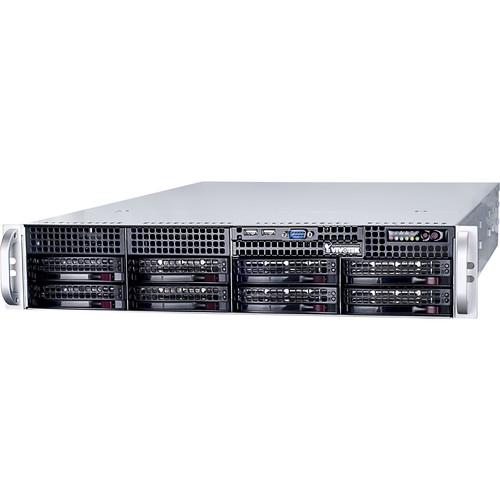
User Manual for Vivotek NR9681 H.265 2U 64-Channel NVR Click to enlarge the picture
 Contents of the user manual for the Vivotek NR9681 H.265 2U 64-Channel NVR
- Product category: Network Video Recorders (NVRs) Vivotek
- Brand: Vivotek
- Description and content of package
- Technical information and basic settings
- Frequently asked questions – FAQ
- Troubleshooting (does not switch on, does not respond, error message, what do I do if...)
- Authorized service for Vivotek Network Video Recorders (NVRs)
|
User manual for the Vivotek NR9681 H.265 2U 64-Channel NVR contain basic instructions
that need to be followed during installation and operation.
Before starting your appliance, the user manual should be read through carefully.
Follow all the safety instructions and warnings, and be guided by the given recommendations.
User manual is an integral part of any Vivotek product,
and if it is sold or transferred, they should be handed over jointly with the product.
Following the instructions for use is an essential prerequisite for protecting
health and property during use, as well as recognition of liability on the part of the manufacturer
for possible defects should you make a warranty claim. Download an official Vivotek user manual in which you will find instructions on how to install, use, maintain and service your product.
And do not forget – unsuitable use of a Vivotek product will considerably shorten its lifespan!
|
Product description The NR9681 H.265 2U 64-Channel NVR from VIVOTEK is a 2U 64-channel 8-bay rackmount network appliance, with standard RAID capability, and H.265 video codec. The total storage capacity of the NVR provides scalability and flexibility, making it ideal for large-scale transport or industrial applications, as well as public spaces such as campuses. The NR9681 NVR’s 8 hard drive bay design provides for a storage capacity of up to 48TB (HDD sold separately) and uses H.264 compression. The RAID 0/1/5/6/10 configuration provides further data security in the event of a hard drive failure. The NR9681 NVR supports VIVOTEK’s fisheye network camera Fisheye Dewarp function, which provides multiple dewarping modes in live view and playback, ensuring the correct angle of video view and detailed information for flexible usage. This NVR is also programmed to carry out remote management with a full range of server/client. The NVR features well-built ONVIF compliance and scalable configuration, with VAST CMS empowering users to set up and manage IP surveillance systems with ease. It also supports both remote and mobile access via the iViewer app, for both iOS and Android handheld devices. - H.265/H.264 compression technology
- 64-channel recording and display
- Supports HDMI, Display Port, VGA, and DVI simultaneous output
- Supports RAID 0/1/5/6/10 storage
- Maximum support of up to 48TB HDD
- VIVOTEK VAST Inside (LiveClient/Playback)
- Dual LAN giga network ports
- VIVOTEK camera configuration and VAST CMS integrated
- Multiple Fisheye Dewarp support
- Multiple video search modes
In the Box Vivotek NR9681 H.265 2U 64-Channel NVR Power Cord 8 x HDD Tray USB Mouse Limited 3-Year Warranty Brochure PDF 540.2kb Table of Contents
|
Upload User Manual
Have you got an user manual for the Vivotek NR9681 H.265 2U 64-Channel NVR in electronic form? Please send it to us and help us expand our library of instruction manuals.
Thank you, too, on behalf of other users.
To upload the product manual, we first need to check and make sure you are not a robot. After that, your "Submit Link" or "Upload File" will appear.
Technical parametersVivotek NR9681 Specs | | | Operating system | Embedded Windows | | CPU | Intel Core i5 | | Flash | 64 GB SATA DOM | | RAM | 8 GB | | Watchdog Function | Hardware + software | | Output Voltage Restoration | System restart automatically after power recovery | | | | HDD | 8 x Hot-swappable tray | | HDD Capacity | 8 x 6 TB (maximum) | | Disk Management | Create, format and remove disk
RAID 0, 1, 5, 6, 10 | | | | Video Output | 1 x HDMI, 1 x Display Port, 1 x VGA, 1 x DVI | | Resolution | HDMI: 3200 x 2000
DP: 3200 x 2000
VGA/DVI: 1920 x 1200 | | Graphics | Hardware decoding | | Decoding | H.265/H.264: 1920 x 1080 @ 270 fps (4 Mb/sec) | | Camera Position | Change the viewcell position on the Live View screens | | | | USB Interface | 4 x USB 2.0
2 x USB 3.0 | | Audio | 1 x Microphone audio jack Input
1 x 3.5 Line input audio jack
1 x 3.5 Line output audio jack | | | | Network Interface | 2 x 10/100/1000Mbps Ethernet (RJ45) | | Protocols | IPv4, TCP/IP, HTTP, HTTPS, UPnP, RTSP/RTP/RTCP, SMTP, FTP, DHCP, NTP, DNS, DDNS, IP Filter | | | | Power Input | Redundant Power 100 to 220 VAC | | Power Consumption | Maximum 740 W | | | | LED Indicator | Power, HDD, Net1, Net2, Overheat, Power fail | | | | Operating System | Microsoft Windows 8, 7, Vista, XP
Microsoft Windows Server 2012, 2008, 2003, 2000 | | CPU | Intel Celeron or above | | Memory | 2 GB or above | | Ethernet | 10/100 Mb/sec | | Display Resolution | 1024 x 768 pixels or above | | Web Browser | Internet Explorer 11/10/9 (32-bit) | | Software | Installation Wizard 2, Shepherd, VAST | | Mobile App | iViewer (iOS/Android) | | | | Number of Channels | 64 | | Throughput | Recording: 512 Mb/sec
Network: 400 Mb/sec | | Audio Format | G.711, G.726, AMR, AAC | | Video Format | MJPEG, MPEG4, H.264 AVC, H.264 SVC, H.265 | | Video Resolution | VGA, 1 MP, 2 MP, 3 MP, 5 MP, & 9 MP cameras | | Recording Time | Pre-Record: 3 to 15
Post-Record: 10 to 60 | | Streaming | Single | | Recording Modes | Continuous, Schedule, Manual, Event, Activity Adaptive, Streaming | | Setting | Recycle (Unit: Size or day) | | Recording Path | Local path or network path | | Video Formats | 3 GP | | | | Stream Application | Stream Selection & Auto Stream Size | | LiveView Display | 64-Channel (with dual monitors)
Multi Layout Display: 1 x 1, 2 x 2, 1 + 5, 3 x 3, 1 + 12, 4 x 4, 5 x 5, 1 + 31, 1P + 2, 1P + 6, 1P + 8, 2V, 3V,4V, 2V + 3
Single layout display, full screen display, sequential display | | Monitor Enhancement | Drag & Drop, Remote I/O Control, PiP (Digital Zoom), Instant Replay, Deinterlace, Video Display Mode (Aspect Ratio, Hide Borders, Keep Top/Down Borders), Fisheye Dewarp (Regular: 1O, 1P, 1R, 1O3R, 4R; Wall Mount: 1P2R, 1P3R; Ceiling/Floor Mount: 2P, 4R Pro, 1O8R), Video Enhancement (Basic Mode: Brightness, Contrast, Saturation, Hue; Intelligent Mode: Defog, Rain, Snow, Fire / Smoke) | | PTZ Control | Panel Control & Mouse Click Control | | PTZ Operation | Direction Control, Home, Zoom, Focus, Iris, Preset, Patrol (Group), Pan, Stop, Speed | | | | Display | 16 Channels
Multi Layout Display: 1 x 1, 2 x 2, 1 + 5, 3 x 3, 1 + 12, 4 x 4, 2V, 3V, 4V, 2V + 3
Single Layout Display, Full Screen Display, Sequential Display | | Playback Control | Play, Rewind, Pause, Stop, Next/Previous Video Start, Next/Previous Frame, 1/8x to 64x Speed Control, Bookmark | | Video Search | Browsing, Date & Time (Fast), Event, Bookmark, Alarm, Log, Timeline, Timeline Scale | | Monitor Enhancement | Drag & Drop, PiP (Digital Zoom), De-interlace, Video Display Mode (Aspect Ratio, Hide Borders, Keep Top/Down Borders), Fisheye Dewarp (Regular: 1O, 1P, 1R, 1O3R, 4R; Wall Mount: 1P2R, 1P3R; Ceiling/Floor Mount: 2P, 4R Pro, 1O8R), Video Enhancement (Basic Mode: Brightness, Contrast, Saturation, Hue; Intelligent Mode: Defog, Rain, Snow, Fire/Smoke) | | Snapshot | JPEG & BMP | | Video Clip Export | AVI, 3GP & EXE | | | | LiveView Display | 32 Channels
Multi Layout display: 1 x 1, 2 x 2, 3 x 3, 4 x 4, 5 x 5, 1 + 5, 1 + 12, 1 + 31 | | Monitor Enhancement | Drag & Drop | | PTZ Control | Panel Control | | PTZ Operation | Direction Control, Home, Zoom, Preset | | Snapshot | JPEG | | | | Playback Display | 1 Channel
Multi Layout Display: 1 x 1 | | Playback Control | Regular (Play, Pause, Stop), Speed Control, Timeline, Timeline Scale | | Monitor Enhancement | Drag & Drop | | Snapshot | JPEG | | | | Schedule | Continuous, Schedule, Manual | | Camera | Motion, DI/O, Video Lost/Restore, PIR, Tampering, Temperature, IR, Line Crossing Detection, Loitering Detection, Field Detection | | Station Presets | Substation Connection Status | | Status | Storage: Connection Status, Storage Capacity Status
Station: License Status, Network Status, Virtual Memory Status | | Action Type | Email, Start Recording, Set DO, GSM Short Message, HTTP & Client Notification | | Recording Time | Maximum 30 | | | | Manual Controls | USB Dongle (FAT Format)
NAS (SMB & CIFS) | | | | User Management | Authentication: Basic Account / Windows AD Account
User Account: 1024
User Account Time Limit: No limitation
User Level: Administrator / Power User / User / Operation / Guest | | Log | Operation, System and Event Log | | Date & Time | Sync Server | | Firmware | Manual update | | Restore Default | Supported | | Backup & Restore | Supported | | Language | Czech, English, French, German, Italian, Japanese, Persian, Portuguese, Russian, Spanish, Simplified Chinese, Traditional Chinese | | | | Insert | Manual, Search | | Video Setting | Compression, Resolution, FPS, Video Quality | | Audio | Codec, Bit rate | | PTZ Control | Panel Control & Mouse Click Control | | PTZ Operation | Direction Control, Home, Zoom, Focus, Iris, Preset, Patrol (Group), Pan, Stop, Speed | | Motion Detection | Supported | | ONVIF | Core: Version 2.2 or above (By Project)
Stream: Video (H.264, MPEG4, & MJPEG) & Audio (G.711, One Way)
Recording: Continuous, Schedule, Manual
Control: PTZ Control (Up, Down, Left, Right, & Zoom In/Out)
Discover: Discover other brands of camera through "Insert Camera & Batch Insert" | | | | UPS | Windows UPS-compatible | | Joystick | VIVOTEK USB joystick
All Windows-compatible USB joystick | | I/O Box | Advantech ADAM-6000 | | Switch | VIVOTEK VivoCam PoE Switch (AW-GEV Series) | | | | Safety | CE, LVD, FCC, VCCI, C-Tick, UL | | | | Form Factor | 2U Rackmount | | Buttons | Power, Reset | | Operating Temperature | 41 to 95°F (5 to 35°C) | | Humidity | 0 to 95% | | Dimensions | 3.5 x 1.7 x 26" (8.9 x 4.4 x 65 cm) | | Weight | 60 lb (27 kg) (without HDD) |
Rating100% users recommend this product to others. And what about you?

This product has already been rated by 55 owners. Add your rating and experience with the product.
Discussion
 Ask our technicians if you have a problem with your settings,
or if anything is unclear in the user manual you have downloaded.
You can make use of our moderated discussion.
The discussion is public and helps other users of our website who may be encountering similar problems.
Ask our technicians if you have a problem with your settings,
or if anything is unclear in the user manual you have downloaded.
You can make use of our moderated discussion.
The discussion is public and helps other users of our website who may be encountering similar problems.
The discussion is empty - enter the first post
Post a new topic / query / comment:
|
|


