User Manual for Vivotek NV9311P 8-Channel 1080p Mobile NVR with Heater Click to enlarge the picture
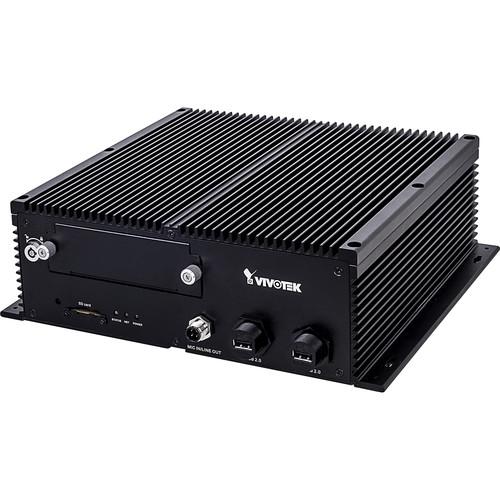 Contents of the user manual for the Vivotek NV9311P 8-Channel 1080p Mobile NVR
- Product category: Network Video Recorders (NVRs) Vivotek
- Brand: Vivotek
- Description and content of package
- Technical information and basic settings
- Frequently asked questions – FAQ
- Troubleshooting (does not switch on, does not respond, error message, what do I do if...)
- Authorized service for Vivotek Network Video Recorders (NVRs)
|
User manual for the Vivotek NV9311P 8-Channel 1080p Mobile NVR contain basic instructions
that need to be followed during installation and operation.
Before starting your appliance, the user manual should be read through carefully.
Follow all the safety instructions and warnings, and be guided by the given recommendations.
User manual is an integral part of any Vivotek product,
and if it is sold or transferred, they should be handed over jointly with the product.
Following the instructions for use is an essential prerequisite for protecting
health and property during use, as well as recognition of liability on the part of the manufacturer
for possible defects should you make a warranty claim. Download an official Vivotek user manual in which you will find instructions on how to install, use, maintain and service your product.
And do not forget – unsuitable use of a Vivotek product will considerably shorten its lifespan!
|
Product description Record from and manage up to eight cameras with the NV9311P 8-Channel 1080p Mobile NVR from Vivotek at resolutions up to 1920 x 1080. This NVR is designed to be installed in vehicles. It has a 2TB storage capacity (HDD/SSD available separately). H.265, H.264, and MJPEG compressions keep file sizes manageable while maintaining the best quality possible. A built-in G-sensor will be triggered in the event of an accident or extreme vibrations.
This NVR complies with ONVIF 2.2 or higher for interoperability with ONVIF cameras. It is equipped with a built-in heater. The recorder's aluminum enclosure provides surge, shock, and vibration protection. - Mobile NVR designed to be installed in vehicles
- Smart Stream II technology optimizes bandwidth efficiency
- H.265, H.264, and MJPEG compressions
- Recording modes include continuous, schedule, manual, event, and activity adaptive streaming
- Support for simultaneous live view and playback modes for one fisheye network camera
- Multiple fisheye dewarping modes
- GNSS receiver supports GPS, Galileo, and GLONASS satellite navigation systems
- Compatible with Shepherd, VAST 2, and Internet Explorer 10 or higher (32-bit Windows)
- GPS tracking on Google Maps with VAST 2 VMS
- PTZ operation includes direction control, home, iris, preset, patrol (group), and PiP control
- iViewer app for iOS and Android
- Video search by calendar, date/time, and alarm
- 64 Mb/s recording throughput
- 96 Mb/s video throughput for remote client
- LAN, Wi-Fi, and LTE network connections (Wi-Fi and LTE modules optional)
- 1 x mic input and 1 x line output
- 8 x alarm inputs and 4 x alarm outputs
- System restarts automatically after power recovery
- Aluminum enclosure with surge, shock, and vibration protection
In the Box Vivotek NV9311P 8-Channel 1080p Mobile NVR with Heater DC Power Cable HDD Screws GPS Receiver Mic In / Line Out Cable 2 x HDD Lock Keys Pack Network Cable Retention Bracket Set (RJ45) & Screws Limited 3-Year Warranty Table of Contents
|
Upload User Manual
Have you got an user manual for the Vivotek NV9311P 8-Channel 1080p Mobile NVR with Heater in electronic form? Please send it to us and help us expand our library of instruction manuals.
Thank you, too, on behalf of other users.
To upload the product manual, we first need to check and make sure you are not a robot. After that, your "Submit Link" or "Upload File" will appear.
Technical parametersVivotek NV9311P(RJ45) Specs | | | OS | Embedded Linux | | CPU | ARM Processor | | Flash | 256 MB | | RAM | 2 GB | | WatchDog | Hardware and Software | | Power Restoration | System Restarts Automatically After Power Recovery | | | | Live View | 8 Channels
Multi-Layout Display: 1 x 1, 3V, 2 x 2, 3 x 3, 1P + 3, 2P + 3, 1M + 5, 1P + 6 | | Video Output | 1 x HDMI
1 x VGA | | Display Resolutions | 3840 x 2160, 1920 x 1080, 1280 x 720 | | Camera Position | Change the View Cell Position on the Live View Screens | | Stream Application | Constant/Auto Adaptive Stream | | Monitor Enhancement | OSD Display (NVR), OSD Display (Camera), Camera Information, Remote I/O Control, Event Notification, Aspect Ratio | | Fisheye Dewarping | 1O, 1P, 1R, 1O3R, 1O8R | | PTZ Operation | Direction Control, Home, Iris, Preset, Patrol (Group), PiP Control | | | | Compression | H.265, H.264, MJPEG | | Graphics Decoder | Hardware Decoding | | Decoding Resolution | H.265: Up to 4096 x 4096
H.264: Up to 8192 x 8192 | | Decoding Capability | H.265/H.264:
3840 x 2160 at 120 fps (4-Channel)
1920 x 1080 at 480 fps (16-Channel) | | | | Compression | G.711, G.726 | | Audio Input & Output | 1 x Mic In (Reserved)
1 x Line Out | | | | Recording Time | Pre-Record: 5 Seconds (Maximum 10 Seconds)
Post-Record: 20 Seconds (Maximum 300 Seconds) | | Recording Stream | Single | | Throughput | 64 Mb/s | | Recording Modes | Continuous, Schedule, Manual, Event, Activity Adaptive Streaming | | Recording Setting | Recycle (Unit: Day) | | Watermark | Supported | | | | HDD | 1 x 2.5" HDD/SSD (Internal) | | HDD Capacity | 2 TB | | Disk Management | Create, Format, Remove Disk, HDD S.M.A.R.T | | SD Card | 1 x SD Card Slot (Reserved) | | Backup | Schedule Backup to FTP Server | | | | Playback Display | 4 Channels
Multi-Layout Display: 1 x 1, 2 x 2, 1P + 3, 1V + 3 | | Playback Control | Regular (Play, Pause, Stop), Rewind, Next/Previous Frame, Speed Control, Calendar, Event, Timeline, Timeline Scale, Thumbnail (Storyboard) | | Video Search | By Calendar, Date/Time, Alarm | | Thumbnail Explorer | Listing the Thumbnail of Recorded Video (Maximum 2-Channel) | | Snapshot | JPEG | | Video Clip Export | EXE | | | | Ethernet | 1 x 1000M RJ45 Ethernet | | Throughput | Video Throughput for Remote Client: 96 Mb/s | | Wi-Fi | IEEE 802.11a/b/g/n/ac
2T2R Antenna (Optional) | | Mobile Network | LTE (Optional) | | PoE | 8 x 802.3at/af Compliant PoE Ports (RJ45)
PoE Management Supported | | Network Protocols | IPv4, TCP/IP, HTTP, HTTPS, UPnP, RTSP/RTP/RTCP, SMTP, FTP, DHCP, NTP, DNS, DDNS, IP Filter | | | | USB | 2 x USB 2.0 (Front)
1 x USB 2.0 (Rear) | | Alarm Inputs | 8 | | Alarm Outputs | 4 | | Audio | 1 x Mic In (Reserved)
1 x Line Out | | Antenna | 1 x GPS
2 x Wi-Fi
2 x LTE | | RS-232 | 1 x RS-232 Port (Reserved) | | | | Camera Integration | ONVIF Core Spec 2.2 or Higher (Request by Project) | | GNSS | Supports GPS, Galileo, and GLONASS | | G-Sensor | Supported | | Event | Camera: Motion Detection, PIR Detection, Tampering Detection, DI/DO, Disconnection
System: Storage Abnormal, Storage Full, DI/DO, GPS Disconnected, GPS Speed, G-Sensor | | Event Action | Video Recording, Email with Snapshot, Buzzer, PTZ, FTP, DO (Camera, System), Full Screen, Send to CMS | | User Management | User Level: Administrator, Regular User | | Log | System, Recording, User, Error | | Date & Time | Time Zone, Manual, Automatic Sync NTP, Daylight Saving Time | | Software AP | Shepherd, VAST 2 | | Mobile App | iViewer for Android & iOS | | Web Browser | Internet Explorer 10 (32-bit) or Higher (Windows) | | Power Input | 12-48 VDC ±10% | | Power Consumption | Maximum 149 W
Without HDD/SSD and PoE:
Heater Off: Maximum 15 W
Heater On: Maximum 60 W | | Power Management | Programmable Delay On/Off Relative to Ignition or Other Switched Voltage | | Surge Protection | Supported | | Operating Temperature | -40 to 131°F / -40 to 55°C | | Humidity | 0 to 95% | | Material | Aluminum | | Safety Certification | CE, FCC, VCCI, C-Tick, EN50155, EN61373, UL, CB, EN45545, EN50121-3-2/EN50121-4, MIL-STD-810G | | Dimensions (W x D x H) | 11.2 x 9 x 3.5" / 284 x 230 x 90 mm | | Weight | Without HDD: / 4.06 kg |
Rating50% users recommend this product to others. And what about you?

This product has already been rated by 20 owners. Add your rating and experience with the product.
Discussion
 Ask our technicians if you have a problem with your settings,
or if anything is unclear in the user manual you have downloaded.
You can make use of our moderated discussion.
The discussion is public and helps other users of our website who may be encountering similar problems.
Ask our technicians if you have a problem with your settings,
or if anything is unclear in the user manual you have downloaded.
You can make use of our moderated discussion.
The discussion is public and helps other users of our website who may be encountering similar problems.
The discussion is empty - enter the first post
Post a new topic / query / comment:
|
|


