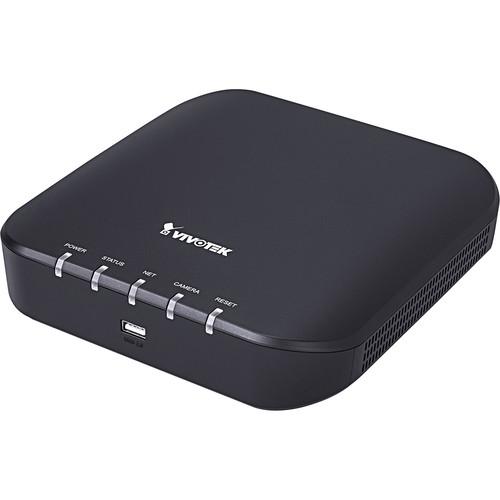
User Manual for Vivotek RX9401 16-Channel H.265 Video Receiver Click to enlarge the picture
 Contents of the user manual for the Vivotek RX9401 16-Channel H.265 Video Receiver
- Product category: Video Encoders & Decoders Vivotek
- Brand: Vivotek
- Description and content of package
- Technical information and basic settings
- Frequently asked questions – FAQ
- Troubleshooting (does not switch on, does not respond, error message, what do I do if...)
- Authorized service for Vivotek Video Encoders & Decoders
|
User manual for the Vivotek RX9401 16-Channel H.265 Video Receiver contain basic instructions
that need to be followed during installation and operation.
Before starting your appliance, the user manual should be read through carefully.
Follow all the safety instructions and warnings, and be guided by the given recommendations.
User manual is an integral part of any Vivotek product,
and if it is sold or transferred, they should be handed over jointly with the product.
Following the instructions for use is an essential prerequisite for protecting
health and property during use, as well as recognition of liability on the part of the manufacturer
for possible defects should you make a warranty claim. Download an official Vivotek user manual in which you will find instructions on how to install, use, maintain and service your product.
And do not forget – unsuitable use of a Vivotek product will considerably shorten its lifespan!
|
Product description The RX9401 16-Channel H.265 Video Receiver from Vivotek is a video receiver equipped for network cameras up to 8MP. It has a decoding capacity for up to 16 channels at lower resolutions. This network video receiver can drive an HD monitor directly via an HDMI video output at up to 4K resolution. Vivotek's fisheye dewarping function provides multiple dewarping modes to deliver the correct views.
With a fanless design and no HDD, this compact device ensures that you will encounter no noise or failure issues. With no expensive VMS client fee, this receiver offers a cost-effective surveillance solution. - Suitable for standalone viewers through local viewing
- ONVIF compliance (project support function)
- Can directly drive a monitor
- Supports various split-window layout display modes
- Compact and light at under 1.2 pounds
In the Box Vivotek RX9401 16-Channel H.265 Video Receiver Power Adapter Mouse Limited 2-Year Warranty Table of Contents
|
Upload User Manual
Have you got an user manual for the Vivotek RX9401 16-Channel H.265 Video Receiver in electronic form? Please send it to us and help us expand our library of instruction manuals.
Thank you, too, on behalf of other users.
To upload the product manual, we first need to check and make sure you are not a robot. After that, your "Submit Link" or "Upload File" will appear.
Technical parametersVivotek RX9401 Specs | | | Operating System | Embedded Linux | | CPU | ARM processor | | Flash | 256 MB | | RAM | 1 GB | | WatchDog | Hardware & software | | Power Restoration | System restarts automatically after power recovery | | Video Output | 1 x HDMI | | Resolution | 3840 x 2160, 1920 x 1080, 1280 x 720 | | Graphics Decoder | Hardware decoding | | Decoding Capacity | H.265/H.264:
1-Channel: 3840 x 2160 at 30 fps
4-Channel: 1920 x 1080 at 120 fps
9-Channel: 1280 x 720 at 270 fps
16-Channel: 720 x 480 at 480 fps | | Camera Position | Change the viewcell position on the live view screens | | USB 2.0 Ports | 1 x front
1 x rear | | Audio | HDMI audio output | | LED Indicators | Power, status, network, camera, reset | | Network Interface | 1 x 10/100M RJ45 Ethernet | | Network Protocols | IPv4, TCP/IP, HTTP, HTTPS, UPnP, RTSP, RTP, RTCP, SMTP, DHCP, NTP, DNS, IP Filter | | Client PC Requirement | OS: Microsoft Windows XP, Vista, 7, 8, 10, Server 2008, Server 2012
CPU: Intel Celeron or above
Memory: 2 GB or above
Ethernet: 10/100M Display Resolution: 1024 x 768 pixels or above
Web Browser: Internet Explorer 10 (32-bit) or above
Software AP: Installation Wizard 2, Shepherd | | Power Input | 12 VDC, 1.5 A | | Power Consumption | Max 9.24 W | | Form Factor | Mini | | Buttons | Reset (back) | | Operating Temperature | 32 to 104°F /0 to 40°C | | Humidity | 0 to 95% | | Certifications | CE, LVD, FCC, VCCI, C-Tick | | Dimensions (W x D x H) | 7.8 x 7.9 x 1.85" / 198 x 200 x 47 mm | | Weight | 1.17 lb / 530 g | | | | Stream Application | Constant, auto adaptive stream | | LiveView Display | 16 channels
Multiple Layout Display:
1 x 1, 2 x 2, 3 x 3, 1P + 3, 2P + 3, 1M + 5, 1P + 6, 3V, 1M + 12, 4 x 4 | | Monitor Enhancement | OSD display (NVR), OSD display (camera), camera information, aspect ratio, fisheye dewarp (1O, 1P, 1R, 103R, 1P3R, 108R) | | PTZ Control | Panel control, joystick | | PTZ Operation | Direction control, home, iris, preset, patrol (group), PiP control | | Manual | USB dongle (FAT format) | | User Management | User Account: 16
User Account Time Limit: 10 minutes
User Level: Administrator | | Date & Time | Time zone, manual, automatic sync NTP, daylight savings time | | Firmware | Manual upgrade | | Restore Default | Supported | | Backup / Restore | Supported | | Languages | Czech, English, French, German, Italian, Japanese, Korean, Portuguese, Russian, Spanish, Simplified Chinese, Traditional Chinese, Polish | | Insert Camera | Manual, search | | ONVIF | Core Spec:
Version 2.2 or above (by project)
Stream:
Video (H.264 & MJPEG)
Discover:
Discover other brand cameras through "Insert Camera & Batch Insert" | | Joysticks | AJ-001, AJ-002 (available separately) | | | | Package Weight | 2.445 lb | | Box Dimensions (LxWxH) | 9.6 x 8.8 x 3.95" |
Rating70% users recommend this product to others. And what about you?

This product has already been rated by 71 owners. Add your rating and experience with the product.
Discussion
 Ask our technicians if you have a problem with your settings,
or if anything is unclear in the user manual you have downloaded.
You can make use of our moderated discussion.
The discussion is public and helps other users of our website who may be encountering similar problems.
Ask our technicians if you have a problem with your settings,
or if anything is unclear in the user manual you have downloaded.
You can make use of our moderated discussion.
The discussion is public and helps other users of our website who may be encountering similar problems.
The discussion is empty - enter the first post
Post a new topic / query / comment:
|
|


