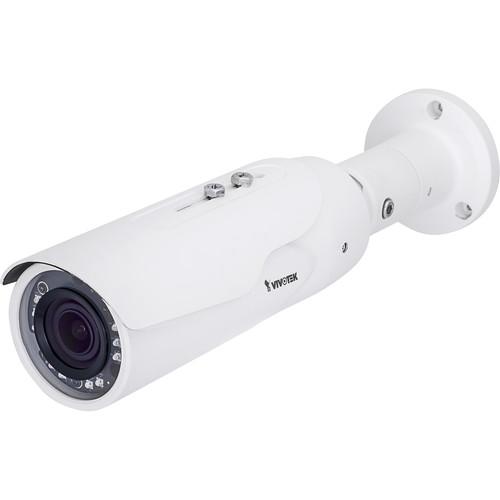
User Manual for Vivotek V Series IB8367A 2MP Outdoor Vandal-Resistant Network Bullet Camera Click to enlarge the picture
 Contents of the user manual for the Vivotek V Series IB8367A 2MP Outdoor
- Product category: Wired IP Cameras Vivotek
- Brand: Vivotek
- Description and content of package
- Technical information and basic settings
- Frequently asked questions – FAQ
- Troubleshooting (does not switch on, does not respond, error message, what do I do if...)
- Authorized service for Vivotek Wired IP Cameras
|
User manual for the Vivotek V Series IB8367A 2MP Outdoor contain basic instructions
that need to be followed during installation and operation.
Before starting your appliance, the user manual should be read through carefully.
Follow all the safety instructions and warnings, and be guided by the given recommendations.
User manual is an integral part of any Vivotek product,
and if it is sold or transferred, they should be handed over jointly with the product.
Following the instructions for use is an essential prerequisite for protecting
health and property during use, as well as recognition of liability on the part of the manufacturer
for possible defects should you make a warranty claim. Download an official Vivotek user manual in which you will find instructions on how to install, use, maintain and service your product.
And do not forget – unsuitable use of a Vivotek product will considerably shorten its lifespan!
|
Product description Monitor an outdoor area with the IP66- and IK10-rated V Series IB8367A 2MP Outdoor Vandal-Resistant Network Bullet Camera from Vivotek. It has a 2.8-12mm varifocal lens with a 103.1-38.3° diagonal field of view to capture 1080p video at up to 30 fps. It features IR LEDs to capture low-light images from up to 98' away, while enhanced WDR and SNV technology further help produce accurate images in varying lighting conditions. PoE technology reduces the need for additional cable runs by transmitting both data and power over a single Ethernet cable. - 2MP 1/2.9" progressive scan CMOS sensor captures 1920 x 1080 resolution video at up to 30 fps
- IR LEDs, WDR enhanced, and SNV technology for low-light imaging
- 2.8-12mm varifocal lens has a 103.1-38.3° diagonal field of view to monitor medium-sized areas
- Smart IR technology to avoid overexposure and Smart Stream II to optimize bandwidth efficiency
- IP66-rated for outdoor use
- IK10-rated for impact and vandal resistance
In the Box Vivotek V Series IB8367A 2MP Outdoor Vandal-Resistant Network Bullet Camera Sunshield Cable Management Bracket Alignment Sticker Mounting Hardware Limited 3-Year Warranty Guides & Manuals Table of Contents
|
Upload User Manual
Have you got an user manual for the Vivotek V Series IB8367A 2MP Outdoor Vandal-Resistant Network Bullet Camera in electronic form? Please send it to us and help us expand our library of instruction manuals.
Thank you, too, on behalf of other users.
To upload the product manual, we first need to check and make sure you are not a robot. After that, your "Submit Link" or "Upload File" will appear.
Download User ManualThe user manual for the Vivotek V Series IB8367A 2MP Outdoor Vandal-Resistant Network Bullet Camera can be downloaded in PDF format at the link stated below.
Technical parametersVivotek IB8367A Specs | | | Image Sensor | 2 MP 1/2.9" progressive scan CMOS sensor | | Maximum Resolution | 1920 x 1080 | | Lens Type | Varifocal, manual | | Focal Length | 2.8-12mm | | Aperture | f/1.4-2.4 | | Iris | DC-Iris | | Field of View | Horizontal: 100.6-36.2°
Vertical: 54.9-20.4°
Diagonal: 103.1-38.3° | | Shutter Time | 1/5 to 1/32,000 sec | | WDR Technology | WDR enhanced | | Day/Night | IR cut filter | | Minimum Illumination | Color: 0.05 lux at f/1.4
B&W: 0.01 lux at f/1.4 | | Pan/Tilt/Zoom | ePTZ: 48x digital zoom (4x on IE plug-in, 12x built-in) | | Number of IR LEDs and Range | 10 x IR LEDs, up to 98' (30 m) | | Onboard Storage | microSD/SDHC/SDXC card slot | | | | CPU | Multimedia SoC (system-on-chip) | | Flash | 128 MB | | RAM | 256 MB | | | | Compression | H.264 and MJPEG | | Maximum Frame Rate | 30 fps at 1920 x 1080
In both compression modes | | Maximum Streams | 4 simultaneous streams | | Signal to Noise Ratio (SNR) | 65 dB | | Dynamic Range | 69.4 dB | | Video Streaming | Adjustable resolution, quality, and bit rate
Smart Stream II | | Image Settings | Adjustable image size, quality, and bit rate
Time stamp, text overlay, flip & mirror
Configurable brightness, contrast, saturation, sharpness, white balance, exposure control, gain, backlight compensation, privacy masks
Scheduled profile settings, 3D noise reduction, video rotation, defog | | | | Users | Live viewing for up to 10 clients | | Protocols | IPv4, IPv6, TCP/IP, HTTP, HTTPS, UPnP, RTSP/RTP/RTCP, IGMP, SMTP, FTP, DHCP, NTP, DNS, DDNS, PPPoE, CoS, QoS, SNMP, 802.1X, UDP, ICMP, ARP, SSL, TLS | | Interface | RJ45 10Base-T/100Base-TX Ethernet | | ONVIF | Supported | | | | Video Motion Detection | Five-window video motion detection | | | | Alarm Triggers | Motion detection, manual trigger, periodical trigger, system boot, recording notification, camera tampering detection | | Alarm Events | Event notification using digital output, HTTP, SMTP, FTP, NAS server, and microSD card
File upload via HTTP, SMTP, FTP, NAS server, and microSD card | | | | Operating System | Microsoft Windows 8, 7, Vista, XP, 2000 | | Web Browser | Mozilla Firefox 7-43 (streaming only)
Internet Explorer 7, 8, 9, 10, 11 | | Other Players | VLC: 1.1.11 or above
QuickTime: 7 or above | | | | Connectors | RJ45 | | LED Indicator | System power and status indicator | | Power Input | IEEE 802.3af PoE Class 0 | | Maximum Power Consumption | 10 W | | Casing | Metal | | IP Rating | IP66 | | IK Rating | IK10 | | Safety Certification | CE, LVD, FCC Class A, VCCI, C-Tick | | Operating Temperature | Starting Temperature: 14 to 122°F (-10 to 50°C)
Working Temperature: -4 to 122°F (-20 to 50°C) | | Humidity | 90% | | Dimensions (Ø x H) | 2.8 x 13" (72 x 327 mm) | | Weight | 2.4 lb (1.1 kg) | | | | Package Weight | 3.45 lb | | Box Dimensions (LxWxH) | 11.5 x 9.3 x 4.2" |
Rating60% users recommend this product to others. And what about you?

This product has already been rated by 99 owners. Add your rating and experience with the product.
Discussion
 Ask our technicians if you have a problem with your settings,
or if anything is unclear in the user manual you have downloaded.
You can make use of our moderated discussion.
The discussion is public and helps other users of our website who may be encountering similar problems.
Ask our technicians if you have a problem with your settings,
or if anything is unclear in the user manual you have downloaded.
You can make use of our moderated discussion.
The discussion is public and helps other users of our website who may be encountering similar problems.
The discussion is empty - enter the first post
Post a new topic / query / comment:
|
|



