|
User Manual for Waldorf Blofeld - Desktop Synthesizer Click to enlarge the picture
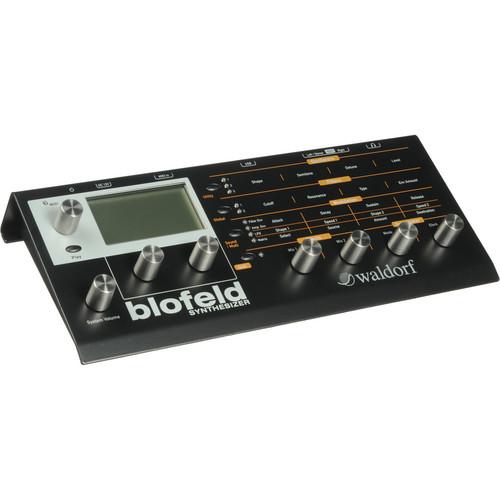 Contents of the user manual for the Waldorf Blofeld - Desktop Synthesizer
- Product category: Synthesizer Modules Waldorf
- Brand: Waldorf
- Description and content of package
- Technical information and basic settings
- Frequently asked questions – FAQ
- Troubleshooting (does not switch on, does not respond, error message, what do I do if...)
- Authorized service for Waldorf Synthesizer Modules
|
User manual for the Waldorf Blofeld - Desktop Synthesizer contain basic instructions
that need to be followed during installation and operation.
Before starting your appliance, the user manual should be read through carefully.
Follow all the safety instructions and warnings, and be guided by the given recommendations.
User manual is an integral part of any Waldorf product,
and if it is sold or transferred, they should be handed over jointly with the product.
Following the instructions for use is an essential prerequisite for protecting
health and property during use, as well as recognition of liability on the part of the manufacturer
for possible defects should you make a warranty claim. Download an official Waldorf user manual in which you will find instructions on how to install, use, maintain and service your product.
And do not forget – unsuitable use of a Waldorf product will considerably shorten its lifespan!
|
Product description The Blofeld from Waldorf is a desktop synthesizer module with over 1,000 sounds, many of which are derived using the company's Q synthesizer oscillator models (all of which are included), along with all of the Microwave II/XT/XTk wavetables. The present synthesis system is based upon the PPG Wave synthesizers of the early '80s, delivering edgy, hard-hitting and bell-like timbres, alongside the warm, organic analog sounds of the Q series. The synthesizer is 16-part multitimbral and provides up to 25 voices.
Each voice has three oscillators that offer authentic circuit models of analog waveforms, while oscillators 1 and 2 feature the two wavetables that were introduced by the Waldorf Q. Control over the brilliance of these wavetables is available, especially important for waves with lots of harmonics in the bass end. Brilliance also affects the sawtooth and pulse oscillator models, delivering everything from warm and soft string pads, to the hard shapes needed for punchy and biting bass sounds. Four envelopes with different types and trigger modes affect any sound parameters.
Oscillators 1 and 2 can be ring-modulated, and a noise generator delivers white noise that can be filtered low or high pass, depending on the noise color setting. The three oscillators, the ring modulator and the noise generator can be freely mixed into filter 1 and filter 2. The two multimode filters per voice can be routed in series or in parallel with each filter having its own pan parameter for easy creation of stereo sounds. The unit offers a freely controllable "Drive" function behind each filter with more than a dozen curves.
Needless to say, the modulation possibilities in the synthesizer are huge. Dozens of modulation sources can be connected to all the important sound generation parameters using a sixteen-slot modulation matrix, plus all the pre-routed modulation destinations. Additionally, the modulators themselves can be modulated. Each of the three LFOs offers sine, triangle, square and sawtooth waveforms, plus sample & hold and random and all can be synchronized to MIDI clock.
The arpeggiator features variable clock divisions from 1/64 triplets to more than 1,000 bars, with variable swing/shuffle, a range of up to ten octaves with multiple trigger styles provided. On the effects side, two slots are available for a multitude of processors, including dynamics, EQ and time-based effects. Finally, the user interface sports a huge graphic display providing precise visual feedback. Seven endless rotaries plus a volume knob all made of steel help the user in exploring the depth of the synthesizer.
License SL is an optional license that can be purchased for those users who wish to play samples through the Blofeld sound engine. The license releases 60 MB of built-in sample flash memory for loading factory or user samples. The samples and multi-samples go through the synthesis engine just like oscillators do. Additionally, a range of optional Soundsets are available for purchase, featuring new patches, and in some cases MIDI files, extending the sonic capabilities of the instrument. -
- Sixteen-part multitimbral
- Up to twenty-five voices
- Three oscillators per voice
- More than 1,000 Sounds
- Frequency modulation between oscillators
- Includes all Q oscillator models and all Microwave II/XT/XTk wavetables
- Modulation Matrix with sixteen slots, freely programmable
- Four modifiers for transforming modulation sources with various algorithms
- Various pre-routed modulation destinations with selectable sources
- Poly, Mono, Dual, or Unisono mode with selectable voice count
- Two independent multi-mode filters per voice
- Filter frequency modulation
- Two drive stages per voice with selectable drive curves
- Three fast LFOs per voice
- Four fast envelopes per voice
- Oscillator synchronization
- Ring Modulator for oscillator 1 / 2
- Noise generator with noise color
- Arpeggiator with freely programmable pattern and up to sixteen steps per sound
- Seven endless, stainless steel control dials
- Five buttons
- 128 x 64 pixels graphic display
- Stereo output
- Headphone output
- MIDI In with LED indicator
- USB connector for MIDI In/Out
In the Box Waldorf Blofeld - Desktop Synthesizer External Power Supply USB Cable One (1) Year Warranty User Manual PDF 8.4mb Table of Contents
|
Upload User Manual
Have you got an user manual for the Waldorf Blofeld - Desktop Synthesizer in electronic form? Please send it to us and help us expand our library of instruction manuals.
Thank you, too, on behalf of other users.
To upload the product manual, we first need to check and make sure you are not a robot. After that, your "Submit Link" or "Upload File" will appear.
Technical parametersWaldorf Blofeld Specs | Sounds | 1,000+ | | Multitimbral | 16 part | | Voices | Up to 25 | | Effects | Chorus
Flanger
Phaser
Overdrive
Triple FX (Sample & Hold, Ring Modulation, Chorus)
Delay (only available on global effect slot)
Clocked Delay (only available on global effect slot)
Reverb (only available on global effect slot) | | Output | 1 x 1/4" TRS Left/Stereo, unbalanced
1 x 1/4" TS Right, unbalanced | | Headphone Jack | 1/4" TRS | | Controllers | 7 x Dials, endless rotation, stainless steel
5 x Function/select/navigation buttons | | USB | 1 x USB Type-B
Uses standard USB MIDI drivers provided by the host computer OS | | MIDI | 1 x 5-pin DIN In | | Display | 128 x 64 pixel graphic display, b/w, white background LED | | Power Requirements | 12V DC via included external power supply | | System Requirements | Windows ME minimum, Windows XP or newer (recommended)
Mac OS X 10.2 minimum, 10.3 or newer recommended | | Dimensions (HxWxD) | Not specified by manufacturer | | Weight | Not specified by manufacturer | | | | Package Weight | 4.65 lb | | Box Dimensions (LxWxH) | 17.8 x 9.0 x 4.1" |
Rating100% users recommend this product to others. And what about you?

This product has already been rated by 90 owners. Add your rating and experience with the product.
Discussion
 Ask our technicians if you have a problem with your settings,
or if anything is unclear in the user manual you have downloaded.
You can make use of our moderated discussion.
The discussion is public and helps other users of our website who may be encountering similar problems.
Ask our technicians if you have a problem with your settings,
or if anything is unclear in the user manual you have downloaded.
You can make use of our moderated discussion.
The discussion is public and helps other users of our website who may be encountering similar problems.
The discussion is empty - enter the first post
Post a new topic / query / comment:
|
|
|
| Request for user manual |
You can’t find the operation manual you are looking for? Let us know and we will try to add the missing manual:
I’m looking for a manual / Request for manual
Current requests for instruction manuals:
Call Of Duty World War Two For Xbox...
controller stratus XL...
stratus XL...
smart whatch serie S11 42mm...
Allen & Heath SQ-6 manual...
|
| Discussion |
Latest contributions to the discussion:
AEW R 4100
Name: MAURICIO ANGARITA
Audio-Technica AEW-R4100 UHF Diversity Receiver for
AEW R 4100 has the mute function blocked and does not allow audio to pass. I tried several times to turn off the mute from the transmitter but it does nothing, the mute stays on. Solution?
Thank you...
Instructions for assembling the 2015 Forecast Image Master Consoles GC3-A
Name: mike elam
Forecast Consoles GC3-A ImageMaster Editing Console
Looking for instructions for assembling this console. ...
EMPTY TONER ERROR MESSAGE AFTER REPLACING TONER
Name: LINDA BAD YELLOW EYES
Brother TN223BK Standard-Yield Toner
I HAD TO CHANGE OUT ALL THREE TONERS DUE TO LEAKS IN THE YELLOW AND CYAN. AFTER I REPLACED THEM, THE MACHINE KEEPS GIVING ME AN EMPTY TONER ERROR MESSAGE. HELP!!...
PS480D 20/24 pin Switching 480W Power Supply
Name: swkargo
Logisys 480W Power Supply
This item states in can run -5vdc .It is NOT listed on the board or I beleive is r4 is missing the resitior. Any body have thid issue. Shawn
...
Help needed
Name: Ann Carter
SanDisk 1TB Extreme Portable USB 3.1
When I click the link to download the user manual for my Sandisk Extreme external hard drive, it gives me the manual for the LG Cricket. Can you please change the link so I can download the Sandisk manual and begin using this drive? Thank you....
|
|


