User Manual for Waves Kramer Master Tape - Tape Saturation Plug-In Click to enlarge the picture
 Contents of the user manual for the Waves Kramer Master Tape - Tape
- Product category: Virtual Processor Plug-Ins Waves
- Brand: Waves
- Description and content of package
- Technical information and basic settings
- Frequently asked questions – FAQ
- Troubleshooting (does not switch on, does not respond, error message, what do I do if...)
- Authorized service for Waves Virtual Processor Plug-Ins
|
User manual for the Waves Kramer Master Tape - Tape contain basic instructions
that need to be followed during installation and operation.
Before starting your appliance, the user manual should be read through carefully.
Follow all the safety instructions and warnings, and be guided by the given recommendations.
User manual is an integral part of any Waves product,
and if it is sold or transferred, they should be handed over jointly with the product.
Following the instructions for use is an essential prerequisite for protecting
health and property during use, as well as recognition of liability on the part of the manufacturer
for possible defects should you make a warranty claim. Download an official Waves user manual in which you will find instructions on how to install, use, maintain and service your product.
And do not forget – unsuitable use of a Waves product will considerably shorten its lifespan!
|
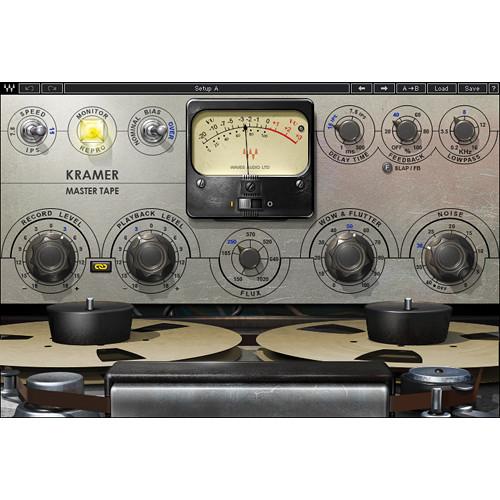
Product description Kramer Master Tape from Waves is a plug-in that models the audio characteristics of a vintage 1/4" reel-to-reel tape machine. The plug-in provides the usual controls found on tape machines, such as adjustable tape speed, bias, and flux, in addition to control over things that were at one time considered faults. Wow and flutter and noise can these days be considered desirable characteristics in some circumstances to add a tape-like signature to digital audio.
The plug-in also includes what was once an unintended consequence of using tape, namely a flexible slap and feedback delay, ideal for rock, dance, dub, or any other audio application. For recording, mixing, mastering, and more, the plug-in delivers the richness and warmth of real tape saturation to any DAW. - Modeled tape saturation plug-in
- Based on a rare vintage 1/4" reel-to-reel machine
- Adjustable tape speed, bias, flux, wow and flutter, slap/feedback delay
- Developed in association with producer/engineer Eddie Kramer
- Up to 24-bit/96 kHz resolution*
*For TDM use, Accel card required for all sample rates with no stereo available at 88.2/96 KHz - Mono and stereo components
- SoundGrid license compatible with MultiRack Native, StudioRack Native, MultiRack SoundGrid, StudioRack SoundGrid, and eMotion ST Mixer
Table of Contents
|
Upload User Manual
Have you got an user manual for the Waves Kramer Master Tape - Tape Saturation Plug-In in electronic form? Please send it to us and help us expand our library of instruction manuals.
Thank you, too, on behalf of other users.
To upload the product manual, we first need to check and make sure you are not a robot. After that, your "Submit Link" or "Upload File" will appear.
Technical parametersWaves KMPXTTDM Specs | System Requirements | Mac
Intel Core i3, i5, i7, Xeon
OS X 10.9.5 to 10.11.4
10.8.5 for Pro Tools 10 only
4 GB RAM
4 GB free hard drive space
1024x768 minimum screen resolution (1280x1024, 1600x1024 recommended)
USB displays are not supported as the primary display
For Native plug-in use, host software that supports AAX Native, Audio Units, RTAS, AudioSuite, VST, or VST3 formats
Windows
Intel Core i3, i5, i7, Xeon
Windows 7 SP1, Windows 8.1, Windows 10 (all 64-bit)
4 GB RAM
4 GB free hard drive space
1024x768 minimum screen resolution (1280x1024, 1600x1024 recommended)
For Native plug-in use, host software that supports AAX Native, RTAS, AudioSuite, VST, or VST3 formats |
Rating80% users recommend this product to others. And what about you?

This product has already been rated by 92 owners. Add your rating and experience with the product.
Discussion
 Ask our technicians if you have a problem with your settings,
or if anything is unclear in the user manual you have downloaded.
You can make use of our moderated discussion.
The discussion is public and helps other users of our website who may be encountering similar problems.
Ask our technicians if you have a problem with your settings,
or if anything is unclear in the user manual you have downloaded.
You can make use of our moderated discussion.
The discussion is public and helps other users of our website who may be encountering similar problems.
The discussion is empty - enter the first post
Post a new topic / query / comment:
|
|


