User Manual for Waves Signature Series Vocals - Plug-In Bundle Click to enlarge the picture
 Contents of the user manual for the Waves Signature Series Vocals - Plug-In
- Product category: Virtual Processor Plug-Ins Waves
- Brand: Waves
- Description and content of package
- Technical information and basic settings
- Frequently asked questions – FAQ
- Troubleshooting (does not switch on, does not respond, error message, what do I do if...)
- Authorized service for Waves Virtual Processor Plug-Ins
 |
User manual for the Waves Signature Series Vocals - Plug-In contain basic instructions
that need to be followed during installation and operation.
Before starting your appliance, the user manual should be read through carefully.
Follow all the safety instructions and warnings, and be guided by the given recommendations.
User manual is an integral part of any Waves product,
and if it is sold or transferred, they should be handed over jointly with the product.
Following the instructions for use is an essential prerequisite for protecting
health and property during use, as well as recognition of liability on the part of the manufacturer
for possible defects should you make a warranty claim. Download an official Waves user manual in which you will find instructions on how to install, use, maintain and service your product.
And do not forget – unsuitable use of a Waves product will considerably shorten its lifespan!
|
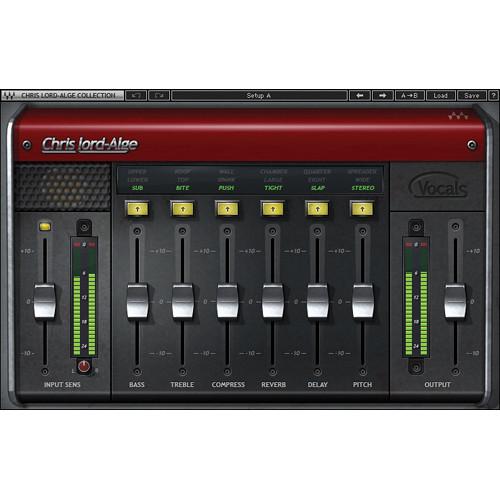
Product description The Signature Series Vocals from Waves comprises four all-in-one, multi-effect vocal plug-ins, and includes CLA Vocals, Eddie Kramer Vocal Channel, JJP Vocals, and Maserati VX1 vocal processing plug-ins. The bundle includes both Native and SoundGrid licenses. - CLA Vocals - Vocal Processing Plug-In (Native/SoundGrid, Download) CLA Vocal from Waves is a plug-in that features Chris Lord-Alge's favorite vocal processor settings for mixing vocals. It works for all styles of singers and includes six essential effects, each with three color coded presets - bass, treble, compression, reverb, delay, and pitch (chorusing/doubling). The plug-in includes both Native and SoundGrid licenses.
- Complete all-in-one processing chains
- Three presets for each processor
- Up to 24-bit/96 kHz resolution
- Mono-to-stereo and stereo components
- SoundGrid license compatible with MultiRack Native, StudioRack Native, MultiRack SoundGrid, StudioRack SoundGrid, and eMotion ST Mixer
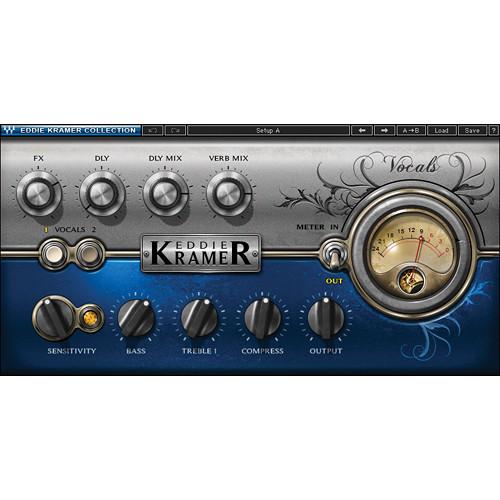
- Eddie Kramer Vocal Channel - Vocal Processing Plug-In (Native/SoundGrid, Download) The Eddie Kramer Vocal Channel from Waves is a plug-in that features processor settings to help achieve a seamless blending of the vocal track with the rest of the instrumentation, while still allowing the vocal to retain all of its original clarity and presence.
Processors include EQ and compression, along with reverb and delay. There are two base settings; Vocal 1 is designed for classic rock vocals with a lot of dynamic range and intensity. Vocals 2 is for gentler vocal performances that stay at smoother, steadier levels.
The plug-in includes both Native and SoundGrid licenses. - All-in-one multi-effect vocal plug-in
- Two vocal processing flavors
- The classic rock sound of the '60s and '70s
- Mono-to-stereo and stereo components
- Up to 24-bit/96 kHz resolution
- SoundGrid license compatible with MultiRack Native, StudioRack Native, MultiRack SoundGrid, StudioRack SoundGrid, and eMotion ST Mixer
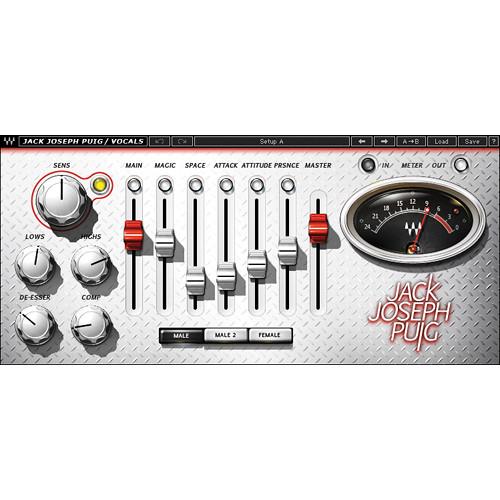
- JJP Vocals - Vocal Processing Plug-In (Native/SoundGrid, Download) JJP Vocals from Waves is a plug-in featuring Jack Joseph Puig's favorite vocal processor settings for treating vocal tracks. The plug-in focuses less on technical details (although there are plenty available) but more on providing an intuitive approach to treating vocals.
Aside from EQ, compression, and de-essing, the main processors include magic, space, attack, attitude, and presence. A choice of three input modes is also provided, that include Male, Male 2, and Female vocal. The plug-in includes both Native and SoundGrid licenses. - All-in-one multi-effect plug-in for vocals
- Created in collaboration with producer/mixer Jack Joseph Puig
- Up to 24-bit/96 kHz resolution
- Mono-to-stereo and stereo components
- SoundGrid license compatible with MultiRack Native, StudioRack Native, MultiRack SoundGrid, StudioRack SoundGrid, and eMotion ST Mixer
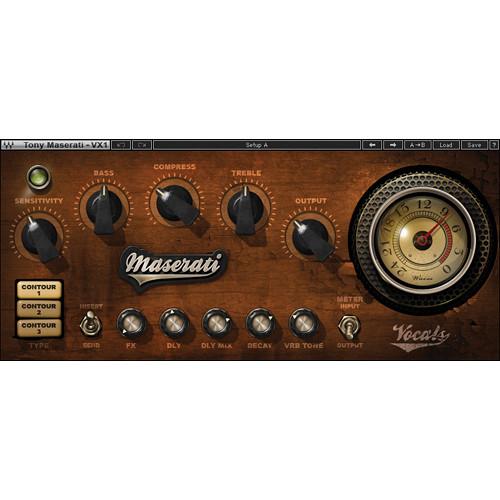
- Maserati VX1 - Vocal Enhancing Plug-In (Native/SoundGrid, Download) Maserati VX1 from Waves is an all-in-one vocal processing chain plug-in that features compression, EQ, delay, reverb and three selectable contours that emulate different room ambience. It can be used as an insert or on an auxiliary channel in send mode.
Contour 1 provides a studio or small venue room ambience; contour 2 is a larger chamber with reflective pre-delays, most suited for slow ballads; and contour 3 is set up for quicker tempo songs with a very small room and matching pre-delay.
The plug-in includes both Native and SoundGrid licenses. - All-in-one multi-effect plug-in for vocals
- Created in collaboration with mixing engineer Tony Maserati
- Up to 24-bit/96 kHz resolution
- Mono-to-stereo and stereo components
- SoundGrid license compatible with MultiRack Native, StudioRack Native, MultiRack SoundGrid, StudioRack SoundGrid, and eMotion ST Mixer
In the Box Bundle Items CLA Vocals - Vocal Processing Plug-In (Native/SoundGrid, Download) vtubtywqzvfccxsrareczs Eddie Kramer Vocal Channel - Vocal Processing Plug-In (Native/SoundGrid, Download) JJP Vocals - Vocal Processing Plug-In (Native/SoundGrid, Download) Maserati VX1 - Vocal Enhancing Plug-In (Native/SoundGrid, Download) Table of Contents
|
Upload User Manual
Have you got an user manual for the Waves Signature Series Vocals - Plug-In Bundle in electronic form? Please send it to us and help us expand our library of instruction manuals.
Thank you, too, on behalf of other users.
To upload the product manual, we first need to check and make sure you are not a robot. After that, your "Submit Link" or "Upload File" will appear.
Technical parameters - CLA Vocals - Vocal Processing Plug-In (Native/SoundGrid, Download)
| System Requirements | Mac
Core Duo 2.3 GHz
OS X 10.7 to 10.10.2
4 GB RAM
1024 x 768 screen resolution
For Native plug-in use, host software that supports AAX Native, Audio Units, RTAS/AudioSuite, or VST formats
PC
Intel Core 2 Duo 2GHz
Windows 7 SP1, Windows 8, Windows 8.1
4 GB RAM
1024 x 768 32-bit screen resolution
For Native plug-in use, host software that supports AAX Native, RTAS/AudioSuite, or VST formats | - Eddie Kramer Vocal Channel - Vocal Processing Plug-In (Native/SoundGrid, Download)
| System Requirements | Mac
Core Duo 2.3 GHz
OS X 10.7 to 10.10.2
4 GB RAM
1024 x 768 screen resolution
For Native plug-in use, host software that supports AAX Native, Audio Units, RTAS/AudioSuite, or VST formats
PC
Intel Core 2 Duo 2 GHz
Windows 7 SP1, Windows 8, Windows 8.1
4 GB RAM
1024 x 768 32-bit screen resolution
For Native plug-in use, host software that supports AAX Native, RTAS/AudioSuite, or VST formats | - JJP Vocals - Vocal Processing Plug-In (Native/SoundGrid, Download)
| System Requirements | Mac
Core Duo 2.3 GHz
OS X 10.7 to 10.10.2
4 GB RAM
1024 x 768 screen resolution
For Native plug-in use, host software that supports AAX Native, Audio Units, RTAS/Audiosuite, or VST formats
PC
Intel Core 2 Duo 2GHz
Windows 7 SP1, Windows 8, Windows 8.1
4 GB RAM
1024 x 768 32-bit screen resolution
For Native plug-in use, host software that supports AAX Native, RTAS/Audiosuite, or VST formats | - Maserati VX1 - Vocal Enhancing Plug-In (Native/SoundGrid, Download)
| System Requirements | Mac
Core Duo 2.3 GHz
OS X 10.7 to 10.10.2
4 GB RAM
1024 x 768 screen resolution
For Native plug-in use, host software that supports AAX Native, Audio Units, RTAS/AudioSuite, or VST formats
PC
Intel Core 2 Duo 2GHz
Windows 7 SP1, Windows 8, Windows 8.1
4 GB RAM
1024 x 768 32-bit screen resolution
For Native plug-in use, host software that supports AAX Native, RTAS/AudioSuite, or VST formats |
Rating100% users recommend this product to others. And what about you?

This product has already been rated by 35 owners. Add your rating and experience with the product.
Discussion
 Ask our technicians if you have a problem with your settings,
or if anything is unclear in the user manual you have downloaded.
You can make use of our moderated discussion.
The discussion is public and helps other users of our website who may be encountering similar problems.
Ask our technicians if you have a problem with your settings,
or if anything is unclear in the user manual you have downloaded.
You can make use of our moderated discussion.
The discussion is public and helps other users of our website who may be encountering similar problems.
The discussion is empty - enter the first post
Post a new topic / query / comment:
|
|


