|
User Manual for Whirlwind E Snake 3 CobraNet EtherSound Click to enlarge the picture
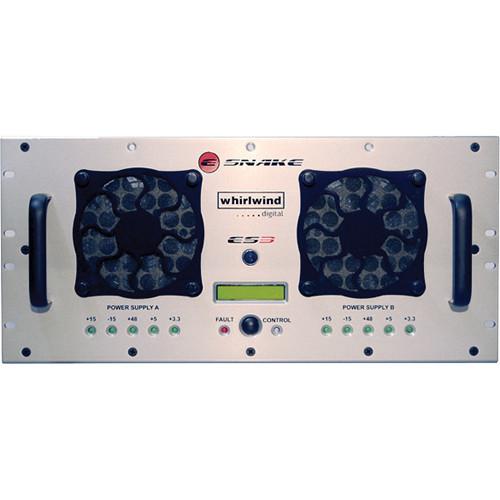 Contents of the user manual for the Whirlwind E Snake 3 CobraNet EtherSound
- Product category: Networked Audio Systems Whirlwind
- Brand: Whirlwind
- Description and content of package
- Technical information and basic settings
- Frequently asked questions – FAQ
- Troubleshooting (does not switch on, does not respond, error message, what do I do if...)
- Authorized service for Whirlwind Networked Audio Systems
|
User manual for the Whirlwind E Snake 3 CobraNet EtherSound contain basic instructions
that need to be followed during installation and operation.
Before starting your appliance, the user manual should be read through carefully.
Follow all the safety instructions and warnings, and be guided by the given recommendations.
User manual is an integral part of any Whirlwind product,
and if it is sold or transferred, they should be handed over jointly with the product.
Following the instructions for use is an essential prerequisite for protecting
health and property during use, as well as recognition of liability on the part of the manufacturer
for possible defects should you make a warranty claim. Download an official Whirlwind user manual in which you will find instructions on how to install, use, maintain and service your product.
And do not forget – unsuitable use of a Whirlwind product will considerably shorten its lifespan!
|
Product description Whirlwind's E Snake 3 CobraNet EtherSound is the most affordable digital snake/digital console pairing available today - you only need the stage side of an E Snake.
In fact, E Snake is compatible with any Yamaha product that supports MY16-CII CobraNet, MY16-ES64 or AVY16-ES Ethersound I/O cards, making it easy to directly interface up to 96 digital channels. Stay in the digital domain all the way from the mics to the amps.
E Snake's preamps will appear as AD8HR units to a Yamaha digital console giving the operator control over gain and phantom power.
The main components of the Whirlwind E Snake system are the E Snake Frame (ES3), E Snake 2 (ES2), and E Snake ControlTM software for managing the system. Two or more of these units connected to each other or through a 100Mb Ethernet switch (transport dependent) with CAT-5 or fiber optic cables will replace the traditional analog multipair audio snake. E Snake currently supports CobraNet and EtherSound, the industry standards for real-time, multi-channel networked audio. Each master unit (ES3 or ES2) consists of a hardware frame and motherboard that can be configured with input and output cards. Each card is capable of processing eight channels of audio. An ES3 can accept up to 4 input and output cards. Therefore, each ES3 is capable of simultaneously processing 32 inputs and 32 outputs.
ES2 can accept any two I/O cards and therefore process up to 16 inputs, 16 outputs or 8 of each. Multiple frames can be used to increase the capacity to literally HUNDREDS of channels if required.
300' of 58-channel multipair cable with multipin connectors weighs approximately 175 lbs. The Whirlwind E Snake can span 328' (100 Meters) with a single CAT-5 cable weighing about 7 pounds. Greater distances can be achieved economically by inserting an additional Ethernet switch functioning as a repeater or converting to fiber optic cable.
Set up and tear down are faster, you'll carry fewer road cases and haul less weight in the truck.
Employing lightweight network cable also opens up added possibilities for routing the cable overhead, around obstacles or underground. And replacing damaged cable is a LOT less expensive than replacing or repairing 58 pair cable and multipin connectors.
Unlike analog snakes, E Snake is virtually impervious to the effects of induced interference and is not subject to ground loop problems. 48kHz sampling rate @ 20 or 24 bit word length coupled with the finest components and designs provide full frequency response and wide dynamic range.
You can start a basic system with an ES3, an ESP1 power supply and as few as 8 channels. Then expand by adding input and output cards for up to a total of 32 channels in each direction. Higher channel counts are easy, just add ES3 or ES2 units to reach the desired number or to split the audio between multiple locations.
Each E Snake unit can be configured with input cards that are available in several versions - mic/line, mic only with Lundahl transformers, or AES/EBU digital.
The mic/line (ESMLI) and transformer (ESTRMI) cards feature studi quality preamps designed to provide wide frequency response and superior S/N ratios. The Whirlwind E Snake Control software (included) provides control of input features such as mic/line switching, 48V phantom power, pad, limiter, gain control, channel labeling and metering.
Additionally, each E Snake unit can be configured with output cards (ESMLO) which convert the digital information back to analog or as AES/EBU digital information (ESAESO). When an analog input card is transmitting to an analog output card, the same level that was input will be present at the output, making E Snake a "virtual wire". As gain is adjusted with E Snake Control to optimize the performance of the input card's A/D converters, the analog level of the output card is adjusted by the same amount but in the opposite direction. Therefore, once you have set your analog console's gain structure, any adjustments made to E Snake's gain stage will not affect the input level at the board. (This gain tracking feature is only available when an E Snake is connected to another E Snake).
Output card types are independent of the type of input card used. Input mic level at the stage and output mic level at the front of house console and AES/EBU at the broadcast truck. An AES/EBU input from the video suite can be a line level analog output on the stage, E Snake supports any combination of input and output cards.
E Snake Control monitors adjustments and stores all of the settings and parameters of your performance to a pair of backup files on your hard drive once each minute and to an internal memory in the hardware. In the event of a communications failure or accidental computer disconnect, E Snake will continue to perform without interruption and with the same settings. Then, the previous state will be loaded into the PC from the backed-up settings when the computer comes back online. There's even a redundant back-up feature that duplicates all parameters to a second removable medium such as a 3.5" floppy, zip drive, USB drive, etc. so that settings can be transferred to a backup PC.
It is designed to be completely functional without unnecessary complication. Its design is so intuitive that you'll be up and running within minutes of installing the software on your PC and connecting it to the E Snake network. However, advanced users will find a robust set of features "under the hood" like user definable channel array pages, color-coded channel text, automatic detection of ES units through unique architecture definitions and full compatibility with other CobraNet or EtherSound devices.
All settings can be saved to preset files for quick recall. Just open a preset file and E Snake Control loads and verifies all of the system architecture, individual channel settings, channel labels and channel array definitions. It's great for repeating stage setups where inputs can be pre-configured and recalled instantly.
The Architecture Editor portion of E Snake Control software allows the user to configure systems with multiple ES units, specify what types of I/O cards are loaded into each unit and setup CobraNet bundle assignments and channel mapping or EtherSound routing.
This flexibility is invaluable when a provider has multiple ES units and I/O card types in their inventory and needs to configure systems with varying capabilities depending on the application.
This can also be especially useful where certain mic channels are not meant for FOH but need to be routed to a recording truck. Or if an ES unit is to be introduced into an existing CobraNet installation, bundle assignments can be customized to produce the expected results.
Since the E Snake is currently uses CobraNet or EtherSound, the industry standards for real-time networked audio, you can interface it with any other compatible product. Use a single E Snake unit configured with input and output cards as an I/O module to get multiple channels of mic or line level audio into or out of an existing system or split the digital signal to multiple nodes with a standard Ethernet switch. This makes E Snake an ideal front end for connecting to a digital mixing console that offers direct digital input interface modules such as Yamaha's PM5D, M7CL, LS9, DM2000, O1V, etc. or to DSP platforms like the Whirlwind E Desk, BIAMP Audia, Peavey Media Matrix, etc.
Whirlwind has been recognized as the leader in audio snakes, cables and splitters for over 30 years. Every bit of that knowledge and experience has gone into researching and developing the E Snake. Table of Contents
|
Upload User Manual
Have you got an user manual for the Whirlwind E Snake 3 CobraNet EtherSound in electronic form? Please send it to us and help us expand our library of instruction manuals.
Thank you, too, on behalf of other users.
To upload the product manual, we first need to check and make sure you are not a robot. After that, your "Submit Link" or "Upload File" will appear.
Technical parametersWhirlwind ES3 Specs | | | Package Weight | 22.222 lb | | Box Dimensions (LxWxH) | 12.0 x 12.0 x 6.0" |
Rating100% users recommend this product to others. And what about you?

This product has already been rated by 34 owners. Add your rating and experience with the product.
Discussion
 Ask our technicians if you have a problem with your settings,
or if anything is unclear in the user manual you have downloaded.
You can make use of our moderated discussion.
The discussion is public and helps other users of our website who may be encountering similar problems.
Ask our technicians if you have a problem with your settings,
or if anything is unclear in the user manual you have downloaded.
You can make use of our moderated discussion.
The discussion is public and helps other users of our website who may be encountering similar problems.
The discussion is empty - enter the first post
Post a new topic / query / comment:
|
|
|
| Request for user manual |
You can’t find the operation manual you are looking for? Let us know and we will try to add the missing manual:
I’m looking for a manual / Request for manual
Current requests for instruction manuals:
Call Of Duty World War Two For Xbox...
controller stratus XL...
stratus XL...
smart whatch serie S11 42mm...
Allen & Heath SQ-6 manual...
|
| Discussion |
Latest contributions to the discussion:
AEW R 4100
Name: MAURICIO ANGARITA
Audio-Technica AEW-R4100 UHF Diversity Receiver for
AEW R 4100 has the mute function blocked and does not allow audio to pass. I tried several times to turn off the mute from the transmitter but it does nothing, the mute stays on. Solution?
Thank you...
Instructions for assembling the 2015 Forecast Image Master Consoles GC3-A
Name: mike elam
Forecast Consoles GC3-A ImageMaster Editing Console
Looking for instructions for assembling this console. ...
EMPTY TONER ERROR MESSAGE AFTER REPLACING TONER
Name: LINDA BAD YELLOW EYES
Brother TN223BK Standard-Yield Toner
I HAD TO CHANGE OUT ALL THREE TONERS DUE TO LEAKS IN THE YELLOW AND CYAN. AFTER I REPLACED THEM, THE MACHINE KEEPS GIVING ME AN EMPTY TONER ERROR MESSAGE. HELP!!...
PS480D 20/24 pin Switching 480W Power Supply
Name: swkargo
Logisys 480W Power Supply
This item states in can run -5vdc .It is NOT listed on the board or I beleive is r4 is missing the resitior. Any body have thid issue. Shawn
...
Help needed
Name: Ann Carter
SanDisk 1TB Extreme Portable USB 3.1
When I click the link to download the user manual for my Sandisk Extreme external hard drive, it gives me the manual for the LG Cricket. Can you please change the link so I can download the Sandisk manual and begin using this drive? Thank you....
|
|


