|
User Manual for X-Rite ColorMunki Display and ColorChecker Passport Bundle Click to enlarge the picture
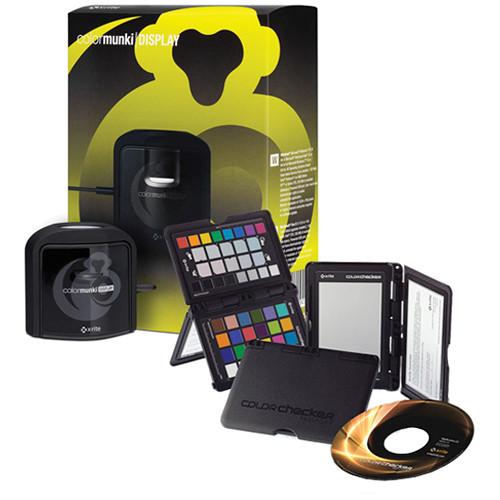 Contents of the user manual for the X-Rite ColorMunki Display and ColorChecker Passport
- Product category: Calibration X-Rite
- Brand: X-Rite
- Description and content of package
- Technical information and basic settings
- Frequently asked questions – FAQ
- Troubleshooting (does not switch on, does not respond, error message, what do I do if...)
- Authorized service for X-Rite Calibration
|
User manual for the X-Rite ColorMunki Display and ColorChecker Passport contain basic instructions
that need to be followed during installation and operation.
Before starting your appliance, the user manual should be read through carefully.
Follow all the safety instructions and warnings, and be guided by the given recommendations.
User manual is an integral part of any X-Rite product,
and if it is sold or transferred, they should be handed over jointly with the product.
Following the instructions for use is an essential prerequisite for protecting
health and property during use, as well as recognition of liability on the part of the manufacturer
for possible defects should you make a warranty claim. Download an official X-Rite user manual in which you will find instructions on how to install, use, maintain and service your product.
And do not forget – unsuitable use of a X-Rite product will considerably shorten its lifespan!
|
Product description Video: Quick Look at the X-Rite ColorMunki Display + ColorChecker Passport Read More - X-Rite ColorMunki Display & ColorChecker Passport: Quick Look
- ColorMunki Display
The X-Rite ColorMunki Display and ColorChecker Passport Bundle provides you with both the ColorMunki calibration and profiling system and the ColorChecker Passport for reducing processing time and improving quality control in your RAW file workflow.
ColorMunki accurately portrays on your display / projector the color in your original picture or digital file. ColorMunki makes it quick and easy for you to calibrate and profile your displays. It features an advanced and ergonomic multi-functional measurement device, as well as easy-to-use software with simple one-click presets or wizard-driven options for more control.
The ColorMunki Display incorporates advanced filter and optical systems, fast measurement speed and unrivaled color accuracy on all modern display technologies, including LED and Wide Gamut LCDs. It's also spectrally calibrated, which makes it field-upgradeable to support future display technologies. ColorMunki's ergonomic design incorporates 3 functions - ambient light measurement, monitor profiling, and projector profiling - into 1 sleek, compact and fully integrated device with no parts for you to misplace. A custom-designed RGB filter set provides accurate color measurements, while the optical design allows for high rates of repetition on the same display and across different display types for more consistent color matching. There's even a rotating diffuser arm that can be used as a stand for table top projector profiling, ambient light measurement, or as a cover for instrument optics. The conveniently integrated tripod mount is great for projector profiling in larger venues.
The software features both 'Easy' and 'Advanced' options, so you can choose the one that's right for you. The wizard-driven interface guides you through the profiling process in small, easy-to-follow steps. No knowledge of color science is required - "Easy" mode is as simple as pushing a button, while "Advanced" mode provides additional pre-defined options for those users who want more color control. Before and after images show instant results and the handy profile reminder notifies you when it is time to re-profile your display. The on-screen help guides and videos are easy to understand and follow, so there are no extra manuals needed.
The Ambient Light Measurement tool automatically determines the optimum display luminance for comparing prints to your display, based on a measurement of the lighting conditions where the prints will be viewed. Ambient Light Smart Control lets you choose whether you want ColorMunki to automatically adjust your profile or simply notify you as ambient light conditions change. Flare Correct measures and compensates for reduced contrast ratios caused by flare light (glare) falling on the surface of your display. By accurately measuring your effective display contrast ratio, ColorMunki gives you a more precise display profile.
Intelligent Iterative Profiling is an adaptive technology that measures and analyzes the color capabilities of each unique display, in order to provide maximum accuracy every time you profile. The Automatic Display Control (ADC) feature adjusts your display's hardware to speed up its operation, eliminating manual adjustments--so there's less work for you.
ColorChecker Passport streamlines your workflow by letting you quickly and easily capture precise, true color, immediately enhancing portraits and landscapes while preserving color control and consistency throughout all phases of the process, from capture to edit. Any photographer seeking more accurate, consistent color and creative versatility should consider the Passport as a viable solution. Create your look via enhanced patches, evaluate shadow details and highlight clipping, and manage color shifting, as well. Plus, create DNG profiles using an industry-standard color reference target. Perform custom in-camera white balance, eliminating the need to correct the individual images later on.
Benefit from Creative Enhancement, Classic, and White Balance targets, as well as camera calibration software with an Adobe Lightroom Plug-In for generating customized DNG profiles quickly and easily for Adobe Imaging solutions. Make global corrections based on accurate info and achieve consistency throughout your images. Though optimized for RAW shooting, ColorChecker Passport will also work well with the JPEG format. Included with the Passport is an adjustable protective case. Note: Testing is still being conducted with plasma displays to try to correct one or more reported issues. ColorMunki may not work on plasma displays. Also note that the ColorMunki software can be downloaded from their site even though discs are included. Also, the ColorMunki is capable of adjusting the color calibration settings of a computer's video card to produce accurate color representation on an attached monitor or LCD projector. It will not function for DLP projectors or home theater projectors. ColorMunki Display - Ergonomic Design
- Incorporates 3 functions - ambient light measurement, monitor profiling, and projector profiling - into 1 sleek, compact and fully integrated device with no parts for you to misplace
- Advanced Filter and Optical Systems
- Custom-designed RGB filter set provides accurate color measurements, while the optical design allows for high rates of repetition on the same display and across different display types for more consistent color matching
- Nearly Universal Compatibility
- Works on virtually all modern display technologies, including LED and Wide Gamut LCDs, and is also spectrally calibrated, which makes it field-upgradeable to support future display technologies!
Please note: Testing is still being conducted with plasma displays to try to correct one or more reported issues. ColorMunki may not work on plasma displays - Great for Projector Profiling
- Rotating diffuser arm can be used as a stand for table top projector profiling, ambient light measurement, or as a cover for instrument optics, and conveniently integrated tripod mount is great for projector profiling in larger venues
- 'Easy' and 'Advanced' Options
- Wizard-driven interface guides you through the profiling process in small, easy-to-follow steps, and there's no knowledge of color science required - "Easy" mode is as simple as pushing a button, while "Advanced" mode provides additional pre-defined options for those users who want more color control
- Before and After Images
- Load instantly, so you don't have to wait
- Profile Reminder
- Handy tool notifies you when it is time to re-profile your display
- Easy-to-Follow Guides
- On-screen help guides and videos are easy to understand and follow, so there are no extra manuals needed
- Ambient Light Measurement
- Automatically determines the optimum display luminance for comparing prints to your display, based on a measurement of the lighting conditions where the prints will be viewed
- Ambient Light Smart Control
- Lets you choose whether you want ColorMunki to automatically adjust your profile or simply notify you as ambient light conditions change
- Flare Correct
- Measures and compensates for reduced contrast ratios caused by flare light (glare) falling on the surface of your display, giving you a more accurate display profile
- Intelligent Iterative Profiling
- Adaptive technology that measures and analyzes the color capabilities of each unique display, in order to provide maximum accuracy every time you profile
- Automatic Display Control (ADC)
- Adjusts your display's hardware to speed up its operation, eliminating manual adjustments--so there's less work for you
ColorChecker Passport - ColorChecker Passport Creative Enhancement Target
- Neutralize and create your look using enhancement patches; check and evaluate shadow details and highlight clipping; and monitor and manage color shifting. Benefit from four rows of color patches designed for image editing with the mere click of an eyedropper. Two rows of warming and cooling patches in the middle help you create visually pleasing, easily repeatable edits. Add warmth to skin tones or enhance deep greens or blues in a landscape. Save setting and apply to other images. Row of clipping patches, separated into light and dark, across bottom function as visual reference for judging, controlling and editing images for shadow details and highlight clipping. Light patches ordered with 1/3 F-stop difference between them, while dark patches ordered same with exception of last patch, which represents blackest patch in target. Roughly 1/10 stop exposure difference between darkest and next darkest patch; dynamic range of target about 32:1 (5 stops). Utilize these patches with clipping preview when working in Adobe to ensure you don't lose details. Across top of target, HSL row features 8 spectrum patches to ensure color fidelity across hues, enabling you to evaluate and edit for any color shifts
- ColorChecker Passport Classic Target
- Use the industry-standard color reference target to create DNG profiles and evaluate specific colors. Passport comes with travel-sized version of Classic 24 patch target. Enjoy consistent, predictable, repeatable results from image to image and camera to camera when combined with camera calibration software. Photograph Classic target under same light as images, then open in processing software and use as reference for color correction. Each patch represents colors of natural objects and reflects light just like real-world counterpart. Each square is colored individually with solid tone to create pure, flat and rich hue without dots or mixed tints. Use Classic to make global corrections based on accurate info and achieve consistency throughout images
- ColorChecker Passport White Balance Target
- Perform customized, in-camera white balance for a consistent white point in a group of images, getting rid of the need to correct each individual image later on. Spectrally flat target provides a neutral reference point across varied lighting situations encountered during photo shoots. Target reflects light equally across visible spectrum, so creating in-camera custom white balance helps compensate for mixed lighting. Get rid of color casts, enhance color preview on camera's display for more reliable histograms, and speed up and simplify post-production color editing by eliminating the need to neutralize each image individually. While RAW shooters can capture anytime during session, JPEG photographers ought to make it their first shot
- ColorChecker Passport Camera Calibration Software
- Includes a desktop application and an Adobe Lightroom Plug-In for generating customized DNG profiles quickly and easily for Adobe Imaging solutions, such as Lightroom, Photoshop, Photoshop Elements, Camera Raw (ACR) and Adobe Bridge. Sophisticated profiling technology produces superb results using only the compact 24-patch ColorChecker Classic target, creating DNG profiles that work wonders even in unusual artificial light sources. Additionally, software auto-detection locates target automatically. Whether you are shooting with a single or multiple cameras, you'll be able to easily establish a precise color foundation and maintain control over your colors. An exciting aspect of the software is the ability to create dual-illuminant DNG profiles, which take into account 2 different light sources to produce a single profile. The profile may then be applied to an even wider array of lighting situations. Make dual-illuminant profiles with any 2 of 21 supported illuminant types, enabling a profile for almost every lighting condition you might encounter. Gain the freedom to switch between represented lighting conditions without having to swap profiles
- ColorChecker Passport Protective Case
- Capable of adjusting to accommodate multiple positions, so you can tweak the targets to any scene. Comes with a useful lanyard, too. Conveniently compact for travel and made of a durable, rugged material, case protects 3 ColorChecker targets from the elements and extends useful life
- For Shooting JPEG Instead of RAW with ColorChecker Passport
- Shooting RAW affords greater flexibility to color-adjust images based upon the way a particular camera captures color. A calibrated RAW workflow reduces color differences between cameras and lenses, adapts for mixed lighting situations, and enables color matching across different scenes. However, ColorChecker Passport does work well with JPEG format, too
- White Balance Target
- Makes sure JPEG files are captured with proper white point, and eliminates the chance of any severe white balance errors that you won't be able to fix later on in JPEG workflow. Helps you save time on post-production edits of each individual shot
- Creative Enhancement Target
- Evaluate and optimize shadow details or highlight clipping via gray ramp patches. Utilize target as visual reference point for color spectrum and color adjustment with HSL (hue, saturation, lightness) patches. Warm or cool your images, as well
- Classic Target
- Photograph Classic target in same lighting as images and use as visual reference point in color correction
Additional ColorChecker Passport Specs - Supported Formats
- Profile: DNG (for ColorChecker Passport)
- Compatible Software
- Software supporting DNG profiles for ColorChecker Passport:
Adobe Lightroom 2.0 or newer
Adobe Photoshop Camera Raw 4.5 or newer
Adobe Photoshop CS3 or newer
Adobe Photoshop Elements 7 or newer
Adobe Bridge CS3 or newer - Editor
- Any RAW editor with click custom white balance capability (for ColorChecker Passport)
- Languages
- ColorChecker Passport: Chinese (Simplified), English, French, German, Italian, Japanese, Portuguese, Spanish
- Operating Temperature
- 32 to 104° F (0 to 40° C) (for ColorChecker Passport)
- Humidity
- 85% or less, non-condensing (for ColorChecker Passport)
- Dimensions
- ColorChecker Passport: 4.9 x 3.5 x 0.35" (12.5 x 9.0 x 0.9 cm)
- Weight
- ColorChecker Passport: 2.8 oz (80 g)
In the Box X-Rite ColorMunki Display and ColorChecker Passport Bundle ColorMunki Display (Black) tvudsxerfbbf ColorChecker Passport Photo (Black) Table of Contents
|
Upload User Manual
Have you got an user manual for the X-Rite ColorMunki Display and ColorChecker Passport Bundle in electronic form? Please send it to us and help us expand our library of instruction manuals.
Thank you, too, on behalf of other users.
To upload the product manual, we first need to check and make sure you are not a robot. After that, your "Submit Link" or "Upload File" will appear.
Technical parametersX-Rite CMUNDISCCPP Specs | System Requirements | Macintosh:
- Mac OS X 10.7.x, or 10.8.x, 10.9.x (with the latest upgrades installed)
- 512 MB RAM (2 GB recommended)
- Intel Core 2 Duo CPU or better CPU
- Up to 500 MB of available disk space (depending on the components installed)
- Powered USB port
- Monitor resolution of 1024 x 768 pixels or higher
- Latest video card drivers installed
- DVD drive or high-speed internet connection required for software installs, downloads, and automatic software updates
- User must have Administrator rights to install and uninstall the application
Windows:
- Microsoft Windows 8.1, 8, or 7 (32/64-bit)
- All operating systems should have the latest Service Pack installed
- 512 MB RAM (2 GB recommended)
- Intel Core 2 Duo or AMD Athlon XP or better CPU
- Up to 500 MB of available disk space (depending on the components installed)
- Powered USB port
- Monitor resolution of 1024 x 768 pixels or higher
- Latest drivers for video card installed
- Dual display support requires either 2 video cards or a dual head video card that supports dual video LUTs being loaded
- Network adapter installed and driver loaded
- DVD drive or high-speed internet connection required for software installs, downloads, and automatic software updates
- User must have Administrator rights to install and uninstall the application | | | | Package Weight | 1.1 lb | | Box Dimensions (LxWxH) | 7.7 x 5.8 x 3.1" | Note: ColorMunki: Testing is still being conducted with plasma displays to try to correct one or more reported issues. ColorMunki may not work on plasma displays
Rating90% users recommend this product to others. And what about you?

This product has already been rated by 26 owners. Add your rating and experience with the product.
Discussion
 Ask our technicians if you have a problem with your settings,
or if anything is unclear in the user manual you have downloaded.
You can make use of our moderated discussion.
The discussion is public and helps other users of our website who may be encountering similar problems.
Ask our technicians if you have a problem with your settings,
or if anything is unclear in the user manual you have downloaded.
You can make use of our moderated discussion.
The discussion is public and helps other users of our website who may be encountering similar problems.
The discussion is empty - enter the first post
Post a new topic / query / comment:
|
|
|
| Request for user manual |
You can’t find the operation manual you are looking for? Let us know and we will try to add the missing manual:
I’m looking for a manual / Request for manual
Current requests for instruction manuals:
Call Of Duty World War Two For Xbox...
controller stratus XL...
stratus XL...
smart whatch serie S11 42mm...
Allen & Heath SQ-6 manual...
|
| Discussion |
Latest contributions to the discussion:
AEW R 4100
Name: MAURICIO ANGARITA
Audio-Technica AEW-R4100 UHF Diversity Receiver for
AEW R 4100 has the mute function blocked and does not allow audio to pass. I tried several times to turn off the mute from the transmitter but it does nothing, the mute stays on. Solution?
Thank you...
Instructions for assembling the 2015 Forecast Image Master Consoles GC3-A
Name: mike elam
Forecast Consoles GC3-A ImageMaster Editing Console
Looking for instructions for assembling this console. ...
EMPTY TONER ERROR MESSAGE AFTER REPLACING TONER
Name: LINDA BAD YELLOW EYES
Brother TN223BK Standard-Yield Toner
I HAD TO CHANGE OUT ALL THREE TONERS DUE TO LEAKS IN THE YELLOW AND CYAN. AFTER I REPLACED THEM, THE MACHINE KEEPS GIVING ME AN EMPTY TONER ERROR MESSAGE. HELP!!...
PS480D 20/24 pin Switching 480W Power Supply
Name: swkargo
Logisys 480W Power Supply
This item states in can run -5vdc .It is NOT listed on the board or I beleive is r4 is missing the resitior. Any body have thid issue. Shawn
...
Help needed
Name: Ann Carter
SanDisk 1TB Extreme Portable USB 3.1
When I click the link to download the user manual for my Sandisk Extreme external hard drive, it gives me the manual for the LG Cricket. Can you please change the link so I can download the Sandisk manual and begin using this drive? Thank you....
|
|


