User Manual for Zoom F8n Multi-Track Field Recorder Kit with F-Control Click to enlarge the picture
 Contents of the user manual for the Zoom F8n Multi-Track Field Recorder Kit
- Product category: Portable Digital Recorders Zoom
- Brand: Zoom
- Description and content of package
- Technical information and basic settings
- Frequently asked questions – FAQ
- Troubleshooting (does not switch on, does not respond, error message, what do I do if...)
- Authorized service for Zoom Portable Digital Recorders
|
User manual for the Zoom F8n Multi-Track Field Recorder Kit contain basic instructions
that need to be followed during installation and operation.
Before starting your appliance, the user manual should be read through carefully.
Follow all the safety instructions and warnings, and be guided by the given recommendations.
User manual is an integral part of any Zoom product,
and if it is sold or transferred, they should be handed over jointly with the product.
Following the instructions for use is an essential prerequisite for protecting
health and property during use, as well as recognition of liability on the part of the manufacturer
for possible defects should you make a warranty claim. Download an official Zoom user manual in which you will find instructions on how to install, use, maintain and service your product.
And do not forget – unsuitable use of a Zoom product will considerably shorten its lifespan!
|
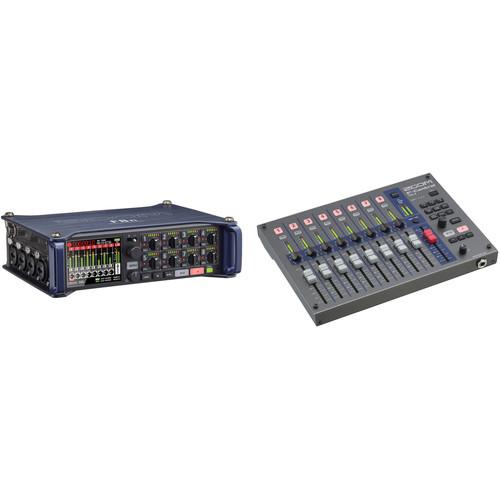
Product description Bundled together by for your convenience, this Zoom F8n Multi-Track Field Recorder Kit provides you with the aforementioned field recorder and the Zoom F-Control, a remote control in a mixer form factor. Among other distinguishing features, the F8n sports look-ahead limiters that eliminate clipping, eight XLR inputs with +75 dB of gain, and the ability to record up to 10 tracks of audio simultaneously. The F-Control sports nine faders (eight for channels and one for the master) in a durable metal chassis. - Zoom F8n Multi-Track Field Recorder
- First Look - Zoom F8n Multi-Track Field Recorder
- Zoom F8n: Connecting Your FRC-8
- Zoom F8n Introduction
- Zoom Mic Capsule Overview
The Zoom F8n Multi-Track Field Recorder is designed for professional and enthusiast recording applications on set and in the field, including music, filmmaking, and electronics news gathering (ENG). Designed to be carried by a shoulder strap or in a bag, the unit features eight analog input channels with XLR/TRS combo jacks that provide +75 dB maximum input gain, and support for line-level inputs. It can record up to 10 tracks simultaneously (channels 1 through 8 plus a stereo mix), or up to eight channels when recording at the A/D converter's maximum 24-bit 192 kHz resolution.The Zoom F8n boasts options like Zoom's AutoMix, which automatically adjusts the levels to reduce ambient sound, ensuring a clean and well-captured sound. If you're working on a one- to four-track project, you can utilize dual-channel recording to create safety tracks. Capture signal loudly with one, and have the other set to low gains as a backup should the louder mic feel over-saturated from too much level.You'll also note the advanced lookahead limiters, which add 1 ms of delay to the signal. This is imperceptible to the person listening and does not affect the final product, but this millisecond makes all the difference in the digital world, as it protects against clipping before it's ever recording. For time code generation, the F8n makes use of a temperature-compensated crystal oscillator that generates time code at 0.2 ppm accuracy, making sure audio and video stay synced. Power to the recorder can be supplied in one of three ways: via AA batteries, an AC adapter, or a 9 to 18 VDC external power pack. Two SD card slots can be used simultaneously for recording even longer sessions and can also be used as card readers when connected to a computer via USB.
When operating via USB, the unit can be used as an 8-in/4-out audio interface at sample rates up to 96 kHz. A built-in slate mic allows you to make voice memos and the unit's slate tone can be used to confirm specific levels. Proprietary Zoom capsules can be plugged into the unit, so you can record stereo straight to the F8n.
- Analog Inputs
- Provides two sets of lockable XLR/TRS combo jacks with EIN of -127 dBu or less, +75 dB maximum input gain and support for +4 dB input.
- Audio Resolution
- Records up to 192 kHz at 24-bit resolution.
- Zoom AutoMix
- This smart software automatically adjusts the levels of your mix to reduce the amount of ambient sound, so you can focus on capturing a well-balanced mix.
- Time Code Generation
- The F8n utilizes a Temperature Compensated Crystal Oscillator (TCXO) that generates time code at 0.2 ppm accuracy, enabling rock-solid syncing of audio and video. When powered off, the F8n will maintain a 0.2 ppm accuracy, and Time code I/O is provided on BNC connectors.
- Advanced Look-Ahead Hybrid Limiters
- The F8n is equipped with Advanced Look-Ahead Hybrid Limiters that provide overload protection no matter what comes your way by adding a 1 millisecond delay; these limiters "look ahead" to anticipate clipping before it's recorded and are applied to each of the 8 channels simultaneously at full resolution—and 10 to 20 dB of headroom to ensure clean audio on every take.
- Simultaneous-Recording
- The F8n can record to an SD card and your computer via USB simultaneously, and you can easily back up your files and stream live while recording. You can also record to two SD cards at once for simultaneous, redundant recording, ensuring you're capturing all the audio all the time.
- Louder, Cleaner, and Clearer Monitoring over Zoom F8
- Volume, clarity, and immersion are equally important for proper monitoring in the field. That's why updates have been made to the F8n's headphone processing to maximize all three. A digital gain boost has been added to minimize ambient bleed, which can cause comb filtering resulting in poor audio quality. Signals can be freely routed to the left and/or right headphone channels, pre- or post-fader. Additionally, the headphone output can be switched to mono. You also can set headphone alert tones for low battery, recording start/stop, or recording errors.
- Onboard Features for Ambisonics and VR
- Capable of recording 360-audio, the F8n sports an Ambisonics mode that features A to B decoding, gain and settings linking, and a customized metering screen.
- Outputs
- Allows you to send the audio signal to a video camera or other device while simultaneously monitoring.
- Mixer Functionality
- Allows for inputs 1-8 to be routed to outputs freely.
- Phantom Power
- Supports +24V and +48V phantom power.
- Three Possible Power Supplies
- Can operate on AA batteries, an AC adapter (included), or a 9 to 18 VDC external power pack (not included) with automatic switching between power supplies.
- Two SDXC Card Slots
- Allows for SD card recording, and the use of SDXC cards enables extended recording capability. The unit can also be used as a card reader by connecting it to a computer via USB.
- USB Audio Interface
- The unit can be used as an 8-in/4-out audio interface at sample rates up to 96 kHz.
- Built-In Microphone
- Works as both a slate mic as well as a tool for voice memos.
- Zoom Mic Capsule Functionality
- Supports the company's line of interchangeable mic capsules that can be used instead of inputs 1/2.
- Pre-Record
- The pre-record function allows you to capture up to 6 seconds of audio before you hit the RECORD button.
UPC: 884354019037 - Zoom F-Control for F8n, F8, and F4 Multitrack Field Recorders
- First Look - Zoom F8n Multi-Track Field Recorder
- Zoom F8n: Connecting Your FRC-8
- Zoom F8n Introduction
- Zoom Mic Capsule Overview
Designed for the location sound recordist, the F-Control from Zoom is a mixing control surface designed for the F8n, F8, and F4 multitrack field recorders. It creates a complete and professional audio rig that offers a broad spectrum of creative possibilities with complete control over sound design and mixing.
The interface provides nine 60mm faders (eight + Master) and hands-on input/output control for trim, pan, and track arming. Monitoring channel and output levels is simple with 12-segment LED meters, three user-programmable buttons, and a dedicated timecode button.
Additional controls include Track Scene Edit buttons which provide shortcut commands to Track Name, Scene Increment, Scene Name, Notes, and False Take. The unit connects to the F8/F4 recorder via USB for a seamless and uncluttered setup, while an additional USB port lets you connect an external keyboard to quickly enter metadata while out in the field. An included 1/4" stereo cable connects the F8/F4 phone out to F-Control's phone in, so you can monitor audio via F-Control's headphone jack.
The durable metal chassis is robust enough to go anywhere, and yet small and light enough to fit into gear bags and backpacks. The F-Control can be powered by an optional DC power supply or via the included four AA batteries. Additionally, the unit can be USB-powered when using the F4 (not available with the F8). The F-Control ships with a stereo audio cable and a USB cable. -
- Nine faders (eight + Master), each 60mm
- 1/4" headphone jack
- USB port for external keyboard connection
- Hands-on input/output control for trim, pan, and track arming
- 12-segment LED meters for monitoring channel and output levels
- Dedicated timecode buttons
- Track Scene edit buttons: Shortcut commands to Track Name, Scene Increment, Scene Name, Notes, and False Take screens
- Power options: 4 x AA batteries, 4-pin Hirose connector with external battery pack, and USB bus power via the F4 (not available with the F8)
- Durable metal chassis
- Compatible with Zoom F8n, F8, and F4 multitrack field recorders
UPC: 884354017606 In the Box - F8n Multi-Track Field Recorder vveetqtfaxbwfvfvbucxsdtbferd
- AD-19 12 VDC Power Adapter
- Set of Download Codes for Cubase LE and WaveLab LE
- Limited 1-Year Warranty
- F-Control for F8n, F8, and F4 Multitrack Field Recorders
Table of Contents
|
Upload User Manual
Have you got an user manual for the Zoom F8n Multi-Track Field Recorder Kit with F-Control in electronic form? Please send it to us and help us expand our library of instruction manuals.
Thank you, too, on behalf of other users.
To upload the product manual, we first need to check and make sure you are not a robot. After that, your "Submit Link" or "Upload File" will appear.
Technical parameters - Zoom F8n Multi-Track Field Recorder
| | | Number of Tracks | WAV:
10 (8 Inputs + Stereo Mix)
MP3:
2 | | Max Sample Rate/Resolution | 192 kHz / 24-Bit | | Microphone | Built-In Slate Mic | | Built-In Speaker | No | | Display | Color LCD | | Memory Card Support | SD (16 MB to 2 GB)
SDHC (4 to 32 GB)
SDXC (64 to 512 GB) | | | | Audio File Formats | BWF, ID3v1, MP3, WAV, iXML | | Sample Rates | WAV:
44.1 / 47.952 / 48 / 48.048 / 88.2 / 96 / 192 kHz
MP3:
44.1 / 48 kHz | | Bit Depth | 16/24-Bit | | Bit Rates | 128 to 320 kb/s | | Timecode | Yes | | Frame Rates Supported | 23.976 / 24 / 25 / 29.97 / 29.97 DF / 30 / 30 DF | | Clock Accuracy |
Rating70% users recommend this product to others. And what about you?

This product has already been rated by 98 owners. Add your rating and experience with the product.
Discussion
 Ask our technicians if you have a problem with your settings,
or if anything is unclear in the user manual you have downloaded.
You can make use of our moderated discussion.
The discussion is public and helps other users of our website who may be encountering similar problems.
Ask our technicians if you have a problem with your settings,
or if anything is unclear in the user manual you have downloaded.
You can make use of our moderated discussion.
The discussion is public and helps other users of our website who may be encountering similar problems.
The discussion is empty - enter the first post
Post a new topic / query / comment:
|
|
|
| Request for user manual |
You can’t find the operation manual you are looking for? Let us know and we will try to add the missing manual:
I’m looking for a manual / Request for manual
Current requests for instruction manuals:
Call Of Duty World War Two For Xbox...
controller stratus XL...
stratus XL...
smart whatch serie S11 42mm...
Allen & Heath SQ-6 manual...
|
| Discussion |
Latest contributions to the discussion:
AEW R 4100
Name: MAURICIO ANGARITA
Audio-Technica AEW-R4100 UHF Diversity Receiver for
AEW R 4100 has the mute function blocked and does not allow audio to pass. I tried several times to turn off the mute from the transmitter but it does nothing, the mute stays on. Solution?
Thank you...
Instructions for assembling the 2015 Forecast Image Master Consoles GC3-A
Name: mike elam
Forecast Consoles GC3-A ImageMaster Editing Console
Looking for instructions for assembling this console. ...
EMPTY TONER ERROR MESSAGE AFTER REPLACING TONER
Name: LINDA BAD YELLOW EYES
Brother TN223BK Standard-Yield Toner
I HAD TO CHANGE OUT ALL THREE TONERS DUE TO LEAKS IN THE YELLOW AND CYAN. AFTER I REPLACED THEM, THE MACHINE KEEPS GIVING ME AN EMPTY TONER ERROR MESSAGE. HELP!!...
PS480D 20/24 pin Switching 480W Power Supply
Name: swkargo
Logisys 480W Power Supply
This item states in can run -5vdc .It is NOT listed on the board or I beleive is r4 is missing the resitior. Any body have thid issue. Shawn
...
Help needed
Name: Ann Carter
SanDisk 1TB Extreme Portable USB 3.1
When I click the link to download the user manual for my Sandisk Extreme external hard drive, it gives me the manual for the LG Cricket. Can you please change the link so I can download the Sandisk manual and begin using this drive? Thank you....
|
|


