|
User Manual for Zoom MS-60B MultiStomp Bass Pedal Click to enlarge the picture
 Contents of the user manual for the Zoom MS-60B MultiStomp Bass Pedal
- Product category: Effects Pedals Zoom
- Brand: Zoom
- Description and content of package
- Technical information and basic settings
- Frequently asked questions – FAQ
- Troubleshooting (does not switch on, does not respond, error message, what do I do if...)
- Authorized service for Zoom Effects Pedals
|
User manual for the Zoom MS-60B MultiStomp Bass Pedal contain basic instructions
that need to be followed during installation and operation.
Before starting your appliance, the user manual should be read through carefully.
Follow all the safety instructions and warnings, and be guided by the given recommendations.
User manual is an integral part of any Zoom product,
and if it is sold or transferred, they should be handed over jointly with the product.
Following the instructions for use is an essential prerequisite for protecting
health and property during use, as well as recognition of liability on the part of the manufacturer
for possible defects should you make a warranty claim. Download an official Zoom user manual in which you will find instructions on how to install, use, maintain and service your product.
And do not forget – unsuitable use of a Zoom product will considerably shorten its lifespan!
|
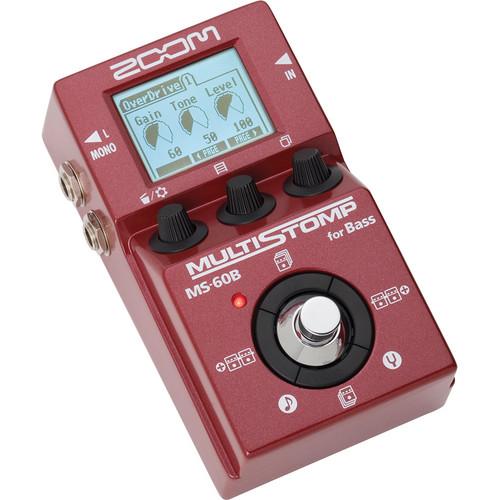
Product description Designed to provide creative bass players with a wide palette of rich bass tones, the Zoom MS-60B MultiStomp Bass Pedal is a multi-effect processor with 58 different effects which are housed in a lightweight, standard-size, single pedal, thereby allowing you to efficiently cut down the size of your pedalboard. Effects include amp/preamp/DI modeling, compression, equalization, modulation, delay, reverb, and more. With its intuitive navigation and clear LCD display, the unit allows you to easily program, save, and rearrange your effects in both studio and low-light stage environments. The MS-60B lets you use up to four effects simultaneously that can be arranged in any order you choose, and individually switched on/off. To get you going right away, it comes with 30 pre-loaded multi-effects which you can edit and store in 50 user-patch memories. For live gigs, you can create a list of up to 26 patches, to cycle through as you step on the pedal's footswitch. Other features include an onboard chromatic tuner which supports both standard and drop-bass tunings, and a Tap Tempo function for synchronizing delay times or modulation rates to your song's tempo. The Zoom MS-60B is fitted with a 1/4" input jack for active and passive instruments, and two 1/4" output jacks for stereo recording or going to two amplifiers. The pedal is powered via two AA batteries, USB bus, or the Zoom AD-16 AC adapter (available separately). - Key Features
-
- 58 x bass effects and amp/preamp/DI models, including modulation, equalization, delay, reverb
- Up to four effects can be used simultaneously, in any order – even bring individual effects in and out of the chain as desired
- DSP microchip performs 32-bit floating-point calculations to create sophisticated studio-quality effects
- 50 x memory locations for the storage of user-created patches
- 30 x factory-preset patches
- Patch cycling of up to 26 presets
- Onboard chromatic tuner supports both standard and drop-bass tuning – bypass all effects during tuning or mute the outputs so that you can tune in silence
- Tap Tempo for synchronization of delay times or modulation rates
- Auto Save function for automatic saving of all patch parameters
- 1/4" input jack (both active and passive instruments supported)
- Dual 1/4" output jacks for stereo recording
- Backlit LCD with contrast control for easy viewing in low-light environments
- USB port for power and firmware updates
- Lightweight and small enough to fit in your gig bag
- Easily integrates into any existing pedalboard
- Runs on two AA batteries (included), with alkaline battery life of up to 7 hours
- USB bus-powered or powered via Zoom AD-16 AC adapter (available separately)
- Power Management function automatically turns the pedal off if unused for extended periods
Effect Types - Dynamics / Filter
-
- 19 x different compressors, limiters, equalizers, filters, exciters, frequency splitters
- Zoom Noise Reduction (ZNR) algorithm, designed to remove noise during pauses while still maintaining your instrument natural tone
- Bass frequency-specific AutoWah and "talking" modulator
- Emulations of MXR DynaComp, Aphex Punch Factory, dbx 160A, BBE Sonic Maximizer, Q-Tron Envelope Filter, Moog MF-101, Z. Vex Seek-Wah
- Overdrive / Distortion
-
- 11 x boosters, overdrives, direct inject / preamp models
- Includes simulations of BOSS ODB-3, DS-1, Metal Zone, Electro-Harmonix Bass Big Muff, SansAmp Bass Driver DI, MXR Bass D.I.+, Xotic Bass BB Preamp, Avalon Design U5
- Amp
-
- 6 x amp models
- Emulations of classic tube amplifiers including Ampeg SVT, Fender Bassman
- Emulations of contemporary amplifiers including Hartke HA3500, Acoustic 360, Aguilar DB750, Italian Markbass Little Mark III
- Each amp emulation can be used with its own distinct cabinet modeling
- Pair any amp model with any cabinet model for custom effects
- Modulation / Special effects
-
- 14 x different modulation and special effects specially crafted for bass
- Includes phasing, flanging, chorusing, tremolo, detuning, pitch shifting, sub-octave generator
- Intelligent bass synthesizer plays along in key
- DeFret effect changes the tone of a fretted bass into that of a fretless
- Delay / Reverb
-
- 8 x rich, dense reverbs, and realistic spatial simulations place your bass in natural-sounding spaces such as rooms, halls, reverb plate emulation
- Delays of up to 4 seconds
- Reverse, modulated, self-oscillating delays
- Slap-back echo
UPC: 884354011550 In the Box Zoom MS-60B MultiStomp Bass Pedal 2 x AA Batteries Limited 1-Year Warranty Table of Contents
|
Upload User Manual
Have you got an user manual for the Zoom MS-60B MultiStomp Bass Pedal in electronic form? Please send it to us and help us expand our library of instruction manuals.
Thank you, too, on behalf of other users.
To upload the product manual, we first need to check and make sure you are not a robot. After that, your "Submit Link" or "Upload File" will appear.
Technical parametersZoom ZMS-60B Specs | Effects | 58 | | Simultaneous Effects | 4 | | Patch Memories | 50 | | Patch Presets | 30 | | Sampling Frequency | 44.1 kHz | | Conversion | A/D: 24-bit, 128 x oversampling
D/A: 24-bit, 128 x oversampling | | Signal Processing | 32-bit floating point, 32-bit fixed point | | Frequency Response | 20 Hz to 20 kHz, +1 dB / -3 dB (into 10 kOhms load) | | Display | LCD | | Input | 1 x 1/4" monaural phone jack
Rated Input Level: -20 dBm
Input Impedance: 1 MOhm | | Outputs | 2 x 1/4" monaural phone jacks
Maximum Output Level: +5 dBm (output impedance load of 10 kOhms or more) | | Power | Batteries: 2 x AA, alkaline or rechargeable NiMH
Continuous Battery Operation Time: 7 hours
AC Adapter: 9 VDC, center-negative, 500 mA (Compatible with Zoom AD-16, available separately)
USB-powered | | USB | Firmware upgrade, bus power | | Dimensions (D x W x H) | 5.1 x 3.0 x 2.3" / 130.3 x 77.5 x 58.5 mm | | Batteries | 12.3 oz / 350.0 g (without batteries) | | | | Package Weight | 1.2 lb | | Box Dimensions (LxWxH) | 6.4 x 3.8 x 3.1" |
Rating100% users recommend this product to others. And what about you?

This product has already been rated by 85 owners. Add your rating and experience with the product.
Discussion
 Ask our technicians if you have a problem with your settings,
or if anything is unclear in the user manual you have downloaded.
You can make use of our moderated discussion.
The discussion is public and helps other users of our website who may be encountering similar problems.
Ask our technicians if you have a problem with your settings,
or if anything is unclear in the user manual you have downloaded.
You can make use of our moderated discussion.
The discussion is public and helps other users of our website who may be encountering similar problems.
The discussion is empty - enter the first post
Post a new topic / query / comment:
|
|
|
| Request for user manual |
You can’t find the operation manual you are looking for? Let us know and we will try to add the missing manual:
I’m looking for a manual / Request for manual
Current requests for instruction manuals:
Call Of Duty World War Two For Xbox...
controller stratus XL...
stratus XL...
smart whatch serie S11 42mm...
Allen & Heath SQ-6 manual...
|
| Discussion |
Latest contributions to the discussion:
AEW R 4100
Name: MAURICIO ANGARITA
Audio-Technica AEW-R4100 UHF Diversity Receiver for
AEW R 4100 has the mute function blocked and does not allow audio to pass. I tried several times to turn off the mute from the transmitter but it does nothing, the mute stays on. Solution?
Thank you...
Instructions for assembling the 2015 Forecast Image Master Consoles GC3-A
Name: mike elam
Forecast Consoles GC3-A ImageMaster Editing Console
Looking for instructions for assembling this console. ...
EMPTY TONER ERROR MESSAGE AFTER REPLACING TONER
Name: LINDA BAD YELLOW EYES
Brother TN223BK Standard-Yield Toner
I HAD TO CHANGE OUT ALL THREE TONERS DUE TO LEAKS IN THE YELLOW AND CYAN. AFTER I REPLACED THEM, THE MACHINE KEEPS GIVING ME AN EMPTY TONER ERROR MESSAGE. HELP!!...
PS480D 20/24 pin Switching 480W Power Supply
Name: swkargo
Logisys 480W Power Supply
This item states in can run -5vdc .It is NOT listed on the board or I beleive is r4 is missing the resitior. Any body have thid issue. Shawn
...
Help needed
Name: Ann Carter
SanDisk 1TB Extreme Portable USB 3.1
When I click the link to download the user manual for my Sandisk Extreme external hard drive, it gives me the manual for the LG Cricket. Can you please change the link so I can download the Sandisk manual and begin using this drive? Thank you....
|
|


