|
User Manual for ZyXEL VMG3925 AC1600 VDSL2 Combo Gateway Click to enlarge the picture
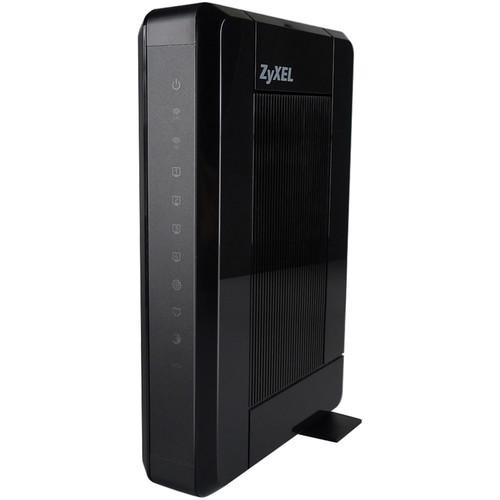 Contents of the user manual for the ZyXEL VMG3925 AC1600 VDSL2 Combo Gateway
- Product category: Wireless Routers ZyXEL
- Brand: ZyXEL
- Description and content of package
- Technical information and basic settings
- Frequently asked questions – FAQ
- Troubleshooting (does not switch on, does not respond, error message, what do I do if...)
- Authorized service for ZyXEL Wireless Routers
 |
User manual for the ZyXEL VMG3925 AC1600 VDSL2 Combo Gateway contain basic instructions
that need to be followed during installation and operation.
Before starting your appliance, the user manual should be read through carefully.
Follow all the safety instructions and warnings, and be guided by the given recommendations.
User manual is an integral part of any ZyXEL product,
and if it is sold or transferred, they should be handed over jointly with the product.
Following the instructions for use is an essential prerequisite for protecting
health and property during use, as well as recognition of liability on the part of the manufacturer
for possible defects should you make a warranty claim. Download an official ZyXEL user manual in which you will find instructions on how to install, use, maintain and service your product.
And do not forget – unsuitable use of a ZyXEL product will considerably shorten its lifespan!
|
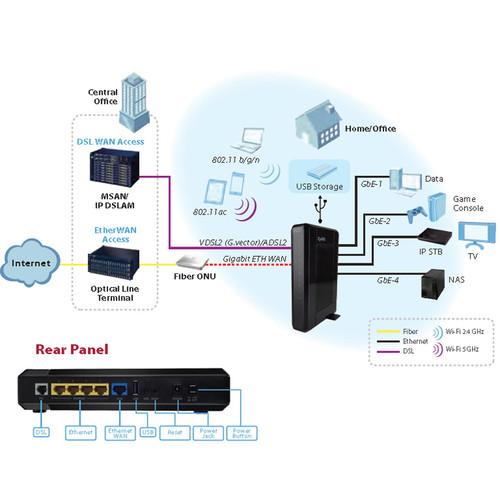
Product description With the VMG3925 AC1600 VDSL2 Combo Gateway from Zyxel, you can take advantage of both DSL and Gigabit Ethernet connectivity, as this gateway comes equipped with both RJ45 and RJ11 ports. Additionally, the VMG3925 supports multiple DSL options as it supports VDSL2 and ADSL2+ to ensure an optimal connection is received.
Accompanying the RJ45 WAN and RJ11 ports, you will find four Gigabit Ethernet ports for a reliable, high-speed, wired network connection option. Clients can also connect wirelessly to this combo gateway, as it supports the 802.11ac Wi-Fi network standard and operates on both the 2.4 GHz and 5 GHz frequencies with data transfer rates of up to 1600 Mbps. Once installed, the VMB3925 offers a variety of network features including VLAN and QoS management, as well as firewall and security features with Stateful Packet Inspection, Denial of Service Prevention, Packet Filtering, and more. - G.vector Optimized Performance
- Zyxel's VMG3925 AC1600 VDSL2 Combo Gateway provides VDSL2 performance with vectoring up to profile 17a. Vectoring decreases crosstalk for increased bandwidth enabling rich multimedia experiences at longer subscriber distances.
- Flexible Deployment with Multiple DSL Options
- The VMG3925 gateway offers enhanced reliability and deployment flexibility with VDSL2 and ADSL2+ fallback, as well as PTM/ATM mode support, with full auto-detection selecting the optimal connection type within either modern or legacy network environments.
- Gigabit Ethernet Combo WAN / LAN Port
- Intended for fiber deployments, the VMG3925 includes a dedicated Gigabit Ethernet Combo WAN port with non-blocking routing performance. This enables operators to use a single CPE for both copper and fiber networks and planned migrations. When deployed in a copper network, the gigabit port can be used as a fifth LAN port.
- 802.11ac High-Powered Wireless Home Connectivity
- The VMG3925 AC1600 VDSL2 Combo Gateway features carrier-grade high-powered dual-band wireless 802.11ac and 802.11n technology to deliver high-speed performance and extended coverage. With 802.11ac Wi-Fi technology, you can take advantage of data rates up to 1300 Mbps over 5 GHz and up to 300 Mbps over 2.4 GHz with stable, reliable wireless connectivity. Additionally, four Gigabit Ethernet LAN ports operate at wire speed for speedy data transfers within the home.
- Comprehensive Routing with IPv6, TR-069, QoS, and Firewall
- The VMG3925 gateway supports IPv4, IPv6/IPv4 Dual Stack, and IPv6 Rapid Deployment (RD) functionality for a strong foundation. Upon this foundation, Zyxel implements advanced features including TR-069 remote management and device configuration, quality of service (QoS) functionality to categorize incoming and outgoing traffic, and a stateful packet inspection (SPI) firewall for end-user security.
UPC: 760559123796 In the Box ZyXEL VMG3925 AC1600 VDSL2 Combo Gateway Limited 2-Year Warranty Table of Contents
|
Upload User Manual
Have you got an user manual for the ZyXEL VMG3925 AC1600 VDSL2 Combo Gateway in electronic form? Please send it to us and help us expand our library of instruction manuals.
Thank you, too, on behalf of other users.
To upload the product manual, we first need to check and make sure you are not a robot. After that, your "Submit Link" or "Upload File" will appear.
Technical parametersZyXEL VMG3925R Specs | DSL Port | • VDSL2 (G.993.2)
- 100 Mbps / 50 Mbps down/up data rates
- 8a, 8b, 8c, 8d, 12a, 12b, 17a profiles
- Dual latency
- G.vector (G.993.5)
• ADSL/2/2+
- ADSL (T1.413), G.dmt (G.992.1), G.lite
- (G.992.2), ADSL2 (G.992.3), ADSL2+
- (G.992.5) compliant
- Reach Extended ADSL2 (Annex L)
- Annex M (G.992.3 / G.992.5)
- ATM/PTM transfer mode
• G.INP value support up to INP=16
• PhyR PHY Level Retransmission Technology
• VDSL2 and ADSL/2/2+ over POTS | | Wi-Fi | • 5 GHz band
- 802.11ac support
- 1.3 Gbps data rate
- Backward compatible to 802.11a/n
- 3x3 antenna array
- High power amplifier
• 2.4 GHz band
- 802.11n support
- 300 Mbps data rate
- Backward compatible to 802.11b/g
- 2x2 antenna array
- 400 mW high power
• WEP data encryption (64/128 bit)
• WPA/WPA2, WPA-PSK/WPA2-PSK (Wi-Fi)
• Protected Access - (Pre-Shared Key)
• WPS (Wi-Fi Protected Setup)
• WDS (Wireless Distribution System)
• Wi-Fi scheduling
• Multiple SSID (up to 4) | | Router | • IPv6
- Dual Stack (IPv6 / IPv4)
- IPv6 Rapid Deployment (6RD)
• DHCP client / server / relay with option 60
• PPPoE / PPPoA / IPoE / IPoA
• DNS server/relay and dynamic DNS
• Network Address/Port Translation (NAT/NAPT)
• Port forwarding and UPnP
• Transparent bridging (802.1d)
• Static route and policy routing
• RIP I / RIP II
• IGMP v1, v2, v3
• IGMP proxy and snooping | | VLAN Support | VLAN & QoS
Flexible packet & tag classification
6-bit DiffServ Code Point (DSCP)
3-bit Class of Service (802.1p CoS)
12-bit VLAN ID (802.1q)
Priority queuing and scheduling | | Security | Firewall & Security
Stateful Packet Inspection (SPI)
Denial of Service (DoS) Prevention
Multiple VPN (IPSec, PPTP) pass-through
Packet filtering
URL keyword blocking
Parental controls | | USB | Adapter support for 3G/4G WAN backup
Media server (DLNA) and file sharing (FTP)
Print server | | Management | Web GUI (HTTP/HTTPS)
Command Line Interpreter (CLI) via Telnet
TR-069 remote management
TR-064 local management
Simple Network Management Protocol (SNMP)
Connectivity Fault Management (802.1ag CFM)
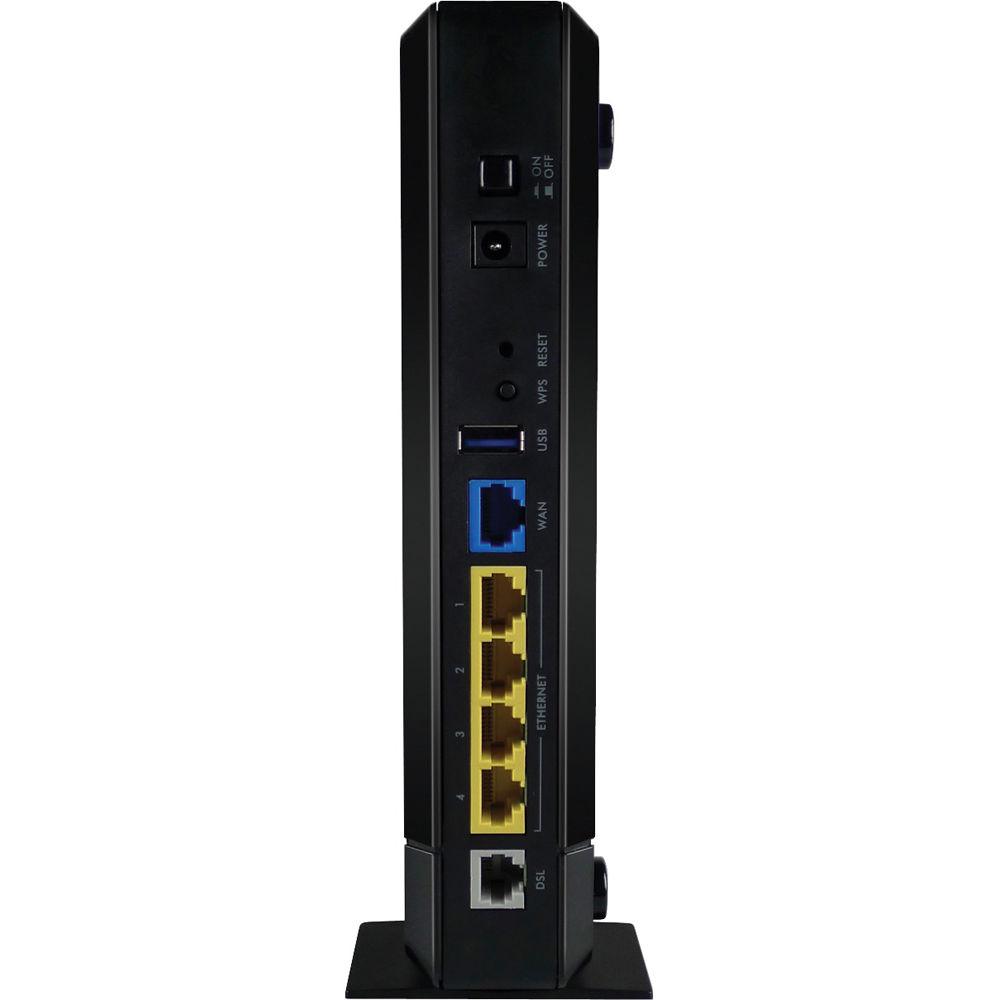
Logs and statistics | | Ports | WAN
1 x RJ11 DSL over POTS port
1 x RJ45 Gigabit Ethernet port (software assignable as 5th LAN port)
LAN
4 x RJ45 Gigabit Ethernet ports
Wireless Interface
2 x Internal 3 dBi antennas (2.4 GHz)
3 x Printed 4 dBi antennas (5 GHz)
USB
1 x Standard-A USB 2.0 host connector | | Buttons | Recessed reset push button
WPS config & WLAN on/off push button
Power on/off switch | | LED Status Indicators | PWR/SYS, DSL, INTERNET, WAN, ETHERNET, Wi-Fi 2.4G, Wi-Fi 5G, USB | | Power Supply | 120 VAC to 12 V / 2 A DC adapter | | Temperature & Humidity | Operating Temperature
32 to 104°F / 0 to 40°C
Storage Temperature
-22 to 158°F / -30 to 70°C
Operating Humidity
20 to 85% RH (non-condensing)
Storage Humidity
20 to 90% RH (non-condensing) | | Certifications | EMC
FCC Part 15 (Class B)
Safety
UL 60950-1 | | Dimensions | 7.24 x 5.80 x 1.72" / 215 x 142 x 42 mm | | Weight | 0.82 lb / 370 g |
Rating100% users recommend this product to others. And what about you?

This product has already been rated by 04 owners. Add your rating and experience with the product.
Discussion
 Ask our technicians if you have a problem with your settings,
or if anything is unclear in the user manual you have downloaded.
You can make use of our moderated discussion.
The discussion is public and helps other users of our website who may be encountering similar problems.
Ask our technicians if you have a problem with your settings,
or if anything is unclear in the user manual you have downloaded.
You can make use of our moderated discussion.
The discussion is public and helps other users of our website who may be encountering similar problems.
The discussion is empty - enter the first post
Post a new topic / query / comment:
|
|
|
| Request for user manual |
You can’t find the operation manual you are looking for? Let us know and we will try to add the missing manual:
I’m looking for a manual / Request for manual
Current requests for instruction manuals:
Call Of Duty World War Two For Xbox...
controller stratus XL...
stratus XL...
smart whatch serie S11 42mm...
Allen & Heath SQ-6 manual...
|
| Discussion |
Latest contributions to the discussion:
AEW R 4100
Name: MAURICIO ANGARITA
Audio-Technica AEW-R4100 UHF Diversity Receiver for
AEW R 4100 has the mute function blocked and does not allow audio to pass. I tried several times to turn off the mute from the transmitter but it does nothing, the mute stays on. Solution?
Thank you...
Instructions for assembling the 2015 Forecast Image Master Consoles GC3-A
Name: mike elam
Forecast Consoles GC3-A ImageMaster Editing Console
Looking for instructions for assembling this console. ...
EMPTY TONER ERROR MESSAGE AFTER REPLACING TONER
Name: LINDA BAD YELLOW EYES
Brother TN223BK Standard-Yield Toner
I HAD TO CHANGE OUT ALL THREE TONERS DUE TO LEAKS IN THE YELLOW AND CYAN. AFTER I REPLACED THEM, THE MACHINE KEEPS GIVING ME AN EMPTY TONER ERROR MESSAGE. HELP!!...
PS480D 20/24 pin Switching 480W Power Supply
Name: swkargo
Logisys 480W Power Supply
This item states in can run -5vdc .It is NOT listed on the board or I beleive is r4 is missing the resitior. Any body have thid issue. Shawn
...
Help needed
Name: Ann Carter
SanDisk 1TB Extreme Portable USB 3.1
When I click the link to download the user manual for my Sandisk Extreme external hard drive, it gives me the manual for the LG Cricket. Can you please change the link so I can download the Sandisk manual and begin using this drive? Thank you....
|
|


