|
User Manuals for Lenses & Lens AccessoriesYou have selected the product series Professional Video - Lenses & Lens Accessories. Now choose the brand, model or product code you are looking for. If it is not available, you can request it from customer support.
Sub-categories – select a sub-category:
Digital Cine Lenses - Follow Focus Solutions - Industrial Lenses - Lens Accessories - Lens Attachments & Adapters - Matte Box Solutions - Professional Lenses - Wireless Lens Control Accessories - Wireless Lens Control Cables - Wireless Lens Control Systems - Zoom & Focus
Manufacturers – select a brand:
Aputure - ARRI - Chrosziel - CINEGEARS - GECKO-CAM - HEDEN - ikan - Kessler Crane - Movcam - RED DIGITAL CINEMA - Redrock Micro - Teradek - Tilta - Wooden Camera
| Showing: 3711-3720 products | Total: 6034 products | | 1 ... 370 | 371 | 372 | 373 | 374 ... 604 |
|
Wooden Camera Simple Canon EF Passive |

 This Simple Canon EF Passive Mount Adapter for RED WEAPON, DRAGON, EPIC, and SCARLET Cameras from Wooden Camera replaces the original mount that came with your camera and allows you to mount you Canon EF lens on your camera. The lens port is passive, which means that no electronic signals will pass from the camera to the lens or vice versa. This m... |
|
Bright Tangerine 143mm Rubber Donut with |

 This is a 143mm Rubber Donut from Bright Tangerine is compatible with Bright Tangerine Viv, Viv 5", Misfit, and Strummer DNA matte boxes. It fits into the 143mm opening on the back of your matte box and blocks light from sneaking past your 117mm broadcast lens and flaring filters. The front of the donut accepts 138mm diameter filters, allowin... |
|
Bright Tangerine Top Flag for Blacklight |

 Bright Tangerine Blacklight Matte Box Overview Add extra flare control to your matte box with this Bright Tangerine Top Flag. The carbon fiber design is lightweight and matches the aesthetic of Bright Tangerine matte boxes. Use the integrated quick release attachment system for mounting on your Blacklight matte box. Integrated variable ... |
|
SLR Magic Rangefinder Cine Adapter with |

 Greatly simplifying the process of focusing with anamorphic adapters, the SLR Magic Rangefinder Cine Adapter with Near/Normal Calibration provides industry standard focus direction and a cine-style focus gear for your lens set up. When using most anamorphic adapters that mount to the front of your lens, focusing requires matching the distance on t... |
|
SLR Magic 25mm T0.95 HyperPrime Cine |
 Cinema Lens Care and Maintenance Read More The 25mm T0.95 HyperPrime Cine III Lens and Variable ND Kit from B&H features a normal focal length lens for Micro Four Thirds cameras with a fast T0.95 maximum aperture and a variable neutral density filter that allows you to keep the iris open in brighter environments to capture images with a shallow de... |
|
Opto Engineering MC12K Series F-Mount 0.67x |

 The MC12K Series F-Mount 0.67x Macro Lens from Opto Engineering is specifically optimized to work with high-resolution 12k and 16k pixel line scan cameras, with sensor sizes up to 62.4mm. Its macro design enables uniform optical performance at short working distances. The MC12K series lens is suitable for industrial applications where maximum ima... |
|
SLR Magic 70mm T4 2x Anamorphot-CINE |

 Cinema Lens Care and Maintenance Read More Known for both its cine-style spherical lenses and anamorphic adapters, SLR Magic has combined the two to create an anamorphic lens. The 70mm 2x Anamorphot-CINE Lens delivers a complete, one piece, anamorphic lens with a maximum aperture of T4. The lens provides a 2.35:1 aspect ratio to your image when us... |
|
Acebil RM-P250 Focus Iris Zoom Controller |
 This Acebil RM-P250 Focus/Iris/Zoom Controller for Panasonic camcorders lets you control your lens functions remotely. Control the lens from your pan handle with the included cables, or extend the controller up to 164' away using separately available cables. The controller's lockable run/start button guards against unintended recording starts and ... |
|
Chrosziel MagNum CineTape 6-Pin LEMO to |
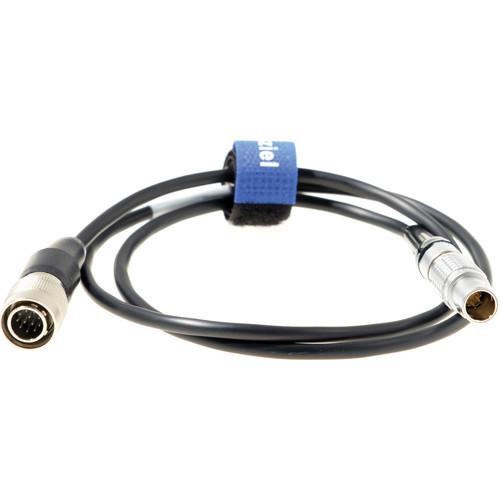 The Chrosziel MagNum CineTape Cable offers an alternative method to connect a CineTape reader to the MagNum's 12-pin Hirose zoom demand connection. In the Box Chrosziel MagNum CineTape 6-Pin LEMO to 12-Pin Hirose Cable Limited 1-Year Warranty Table of Contents ... |
|
| 1 ... 370 | 371 | 372 | 373 | 374 ... 604 | | Showing: 3711-3720 products | Total: 6034 products |
|
|
| Request for user manual |
You can’t find the operation manual you are looking for? Let us know and we will try to add the missing manual:
I’m looking for a manual / Request for manual
Current requests for instruction manuals:
Call Of Duty World War Two For Xbox...
controller stratus XL...
stratus XL...
smart whatch serie S11 42mm...
Allen & Heath SQ-6 manual...
|
| Discussion |
Latest contributions to the discussion:
AEW R 4100
Name: MAURICIO ANGARITA
Audio-Technica AEW-R4100 UHF Diversity Receiver for
AEW R 4100 has the mute function blocked and does not allow audio to pass. I tried several times to turn off the mute from the transmitter but it does nothing, the mute stays on. Solution?
Thank you...
Instructions for assembling the 2015 Forecast Image Master Consoles GC3-A
Name: mike elam
Forecast Consoles GC3-A ImageMaster Editing Console
Looking for instructions for assembling this console. ...
EMPTY TONER ERROR MESSAGE AFTER REPLACING TONER
Name: LINDA BAD YELLOW EYES
Brother TN223BK Standard-Yield Toner
I HAD TO CHANGE OUT ALL THREE TONERS DUE TO LEAKS IN THE YELLOW AND CYAN. AFTER I REPLACED THEM, THE MACHINE KEEPS GIVING ME AN EMPTY TONER ERROR MESSAGE. HELP!!...
PS480D 20/24 pin Switching 480W Power Supply
Name: swkargo
Logisys 480W Power Supply
This item states in can run -5vdc .It is NOT listed on the board or I beleive is r4 is missing the resitior. Any body have thid issue. Shawn
...
Help needed
Name: Ann Carter
SanDisk 1TB Extreme Portable USB 3.1
When I click the link to download the user manual for my Sandisk Extreme external hard drive, it gives me the manual for the LG Cricket. Can you please change the link so I can download the Sandisk manual and begin using this drive? Thank you....
|
|