|
User Manual for COMNET Environmentally Hardened Managed Ethernet Switch Click to enlarge the picture
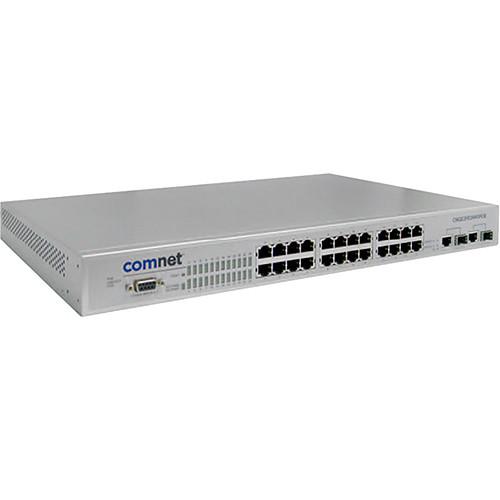 Contents of the user manual for the COMNET Environmentally Hardened Managed Ethernet Switch
- Product category: Network Switches, Bridges & Hubs COMNET
- Brand: COMNET
- Description and content of package
- Technical information and basic settings
- Frequently asked questions – FAQ
- Troubleshooting (does not switch on, does not respond, error message, what do I do if...)
- Authorized service for COMNET Network Switches, Bridges & Hubs
|
User manual for the COMNET Environmentally Hardened Managed Ethernet Switch contain basic instructions
that need to be followed during installation and operation.
Before starting your appliance, the user manual should be read through carefully.
Follow all the safety instructions and warnings, and be guided by the given recommendations.
User manual is an integral part of any COMNET product,
and if it is sold or transferred, they should be handed over jointly with the product.
Following the instructions for use is an essential prerequisite for protecting
health and property during use, as well as recognition of liability on the part of the manufacturer
for possible defects should you make a warranty claim. Download an official COMNET user manual in which you will find instructions on how to install, use, maintain and service your product.
And do not forget – unsuitable use of a COMNET product will considerably shorten its lifespan!
|
Product description The Environmentally-Hardened Managed Ethernet Switch from ComNet provides transmission of twenty-four 10/100 BASE-TX and two 10/100/1000TX or 1000FX combo ports. It is designed for deployment in difficult operating environments, and is available for use with either conventional CAT/5e copper or optical transmission media.The twenty-four electrical ports support the 10/100 Mb/s Ethernet IEEE 802.3 protocol, and auto-negotiating and auto-MDI/MDIX features are provided for simplicity and ease of installation. All twenty-four ports support IEEE.802.3af Class 1-3 based Power over Ethernet (PoE). Two ports are 10/100/1000 configurable for copper or fiber media use with multimode or singlemode optical fiber, selected by optional SFP modules. This network managed layer 2 switch is optically (1000 BASE-FX) and electrically compatible with any IEEE 802.3 compliant Ethernet devices. Plug-and-play design ensures ease of installation, and no electrical or optical adjustments are ever required. - General
-
- Environmentally hardened for direct deployment in difficult unconditioned out-of-plant and roadside installations
- Designed to meet full compliance with the environmental requirements (ambient operating temperature, mechanical shock, vibration, humidity with condensation, high-line/low-line voltage conditions and transient voltage protection) of NEMA TS-1/TS-2 and the Caltrans Specification for Traffic
- Signal Control Equipment
- 10/100 BASE-TX and 1000 BASE-FX compatible
- Uses SFP modules for fiber and connector type and distance
- Redundant power supply compatibility reduces possibility of single-point-of-failure
- Fully configurable through web-based or SNMP network
- IGMP Snooping V1/V2 for multicast filtering and IGMP Query V1/V2
- IEEE802.3af Class 1 - 3 PoE
- Rapid spanning tree protocol (IEEE 802.1W)
- Supports up to 256 Policy ACL (Access Control List)
- Supports 6 KV Ethernet ESD protection
- Supports IEEE802.1ab LLDP
- TFTP firmware update / system restore and backup
- LED status indicators confirm operating status
- Rigid aluminum housing design provides for rack mounting
- IP-30 Protection
- System Interface/Performance
-
- RJ45 port support auto MDI/MDI-X function
- Store-and-forward switching architecture
- 4 megabits packet buffer
- 8K MAC address table
- Redundant power supply design
- VLAN
-
- Port-Based VLAN
- Support 802.1 Q Tag VLAN
- GVRP
- QoS (Quality of Service)
-
- Supports IEEE 802.1p Class of Service
- Each port provides 4 priority queues
- Port base, tag base and type of service priority
- Port Mirror
-
- Monitors traffic in switched networks
- TX packet only
- RX packet only
- Both TX and RX packet
- Security
-
- Port MAC address entries/filter
- IP address security management to prevent unauthorized intruder
- IEEE802.1X/RADIUS login security
- X-Ring
-
- X-Ring, Dual-Homing, Couple Ring and Central Ring Topology
- Provide redundant backup feature and the recovery time below 20ms
- Provides EFT protection 4KV for power line
- Spanning Tree
-
- Supports IEEE802.1d Spanning Tree
- Supports IEEE802.1w Rapid Spanning Tree
- Bandwidth Control
-
- Ingress packet filter and egress rate limit
- Broadcast/multicast packet filter control
- System Event Log
-
- System log server/client
- SMTP e-mail alert
- Relay alarm output system events
- SNMP Trap
-
- Device cold start
- Power failure
- Authentication failure
- Port link up/ link down
- Private trap
- Software
-
- Back-plane (Switching Fabric) speed of 7.2 GB/s
- RFC 2418 SNMP MIB, RFC 1213 MIBII, RFC 2011 SNMP V2 MIB, RFC 1493 Bridge MIB, RFC 2674 VLAN MIB, RFC 1215 Trap MIB, RFC 1643 Ethernet Like, RFC 1757 RMON1, RSTP MIB, UPS MIB, LLDP MIB, Private MIB
- LACP Port with 13 trunk groups/ maximum 4 trunk members
- Supports LLDP to allow switch to advise its identification and capability on the LAN
- Supports X-Ring, Dual Homing and Couple Ring Topology
- Provides redundant backup feature and the recovery time below 20ms
- Supports 50 entries of MAC address for static MAC and another 50 for MAC filter
- Supports 3 mirroring types: RX, TX and both packet
- Supports 10 IP addresses that have permission to access the switch management and to prevent unauthorized intruder
- Support IEEE802.1X Authentication/RADIUS
- Supports up to 255 policy
- Supports ingress packet filter and egress packet limit
- The egress rate control all of the packet types and the limit rates are 0 to 100 Mb/s
- Ingress filter packet type combination rules are broadcast/multicast packet, broadcast packet only and all of packet
- Packet filter rate can be set from 0 to 100 Mb/s
- Supports flow control for full-duplex and back pressure from half-duplex
- Supports system log record and remote system log server
- Supports 1 SMTP server and 6 e-mail accounts for receiving event alert
- Provides one relay alarm output for port breakdown, power fail
- Alarm relay current carry capacity of 1A @ 24 VDC
- Provides DHCP Client/ DHCP Server/ IP Relay functions
- Provides DNS client feature and support primary and secondary DNS server
- Supports SNTP to synchronize system clock in Internet
- Supports TFTP & Console firmware update, TFTP & Console backup and restore
- Supports binary format configuration file for system quick installation
- Each port allows importing 128 bit of alphabetic string of words on SNMP and CLI interface
- Applications
-
- Traffic signalization & surveillance/incident detection networks
- Industrial and factory automation
- Integrated IP-video and data transmission networks
- Industrial security access control systems
UPC: 845770002485 In the Box COMNET Environmentally Hardened Managed Ethernet Switch Limited Lifetime Warranty Table of Contents
|
Upload User Manual
Have you got an user manual for the COMNET Environmentally Hardened Managed Ethernet Switch in electronic form? Please send it to us and help us expand our library of instruction manuals.
Thank you, too, on behalf of other users.
To upload the product manual, we first need to check and make sure you are not a robot. After that, your "Submit Link" or "Upload File" will appear.
Technical parametersCOMNET CNGE2FE24MSPOE Specs | Switch Architecture | Back-plane (Switching Fabric): 8.8 GB/s
Packet throughput ability (Full Duplex): 13.1 Mb/s @ 64 bytes | | Transfer Rate | 14,880pps for Ethernet port
148,800pps for fast Ethernet port
1,488,000pps for gigabit
Ethernet port | | Packet Buffer | 4 megabits | | MAC Address | 8K MAC address table | | Flash ROM | 4 MB | | DRAM | 32 MB | | Jumbo Frame | 9022 bytes (for Gigabit ports) | | Connectors | Front RS232: Female DB-9 (for Console)
10/100TX: 24 x RJ45
Combo: 2 × 10/100/1000T, 2 x SFP 1000FX | | Indicator LEDs | Gigabit Fiber: Link/Activity (Green)
Gigabit Copper: Link/Activity (Green)
Full Duplex/Collision (Amber)
Mini GBIC Link/Activity (Green) | | Pin Assignments | PoE:
RJ45 port #1 - #24 supports IEEE802.3af End-point
Alternative A mode
Positive (VCC+): RJ45 pin 1, 2
Negative (VCC-): RJ45 pin 3, 6
Data (1, 2, 3, 6)
System Power (Green) | | PoE Power Draw | 350 mA continuous | | Power Supply | Power Supply: 45 to 52 VDC (sold separately)
Redundant Power Supply: 45 to 52 VDC
Maximum Power Consumption: 400 W | | Cooling | Natural convection | | Installation | 19" Rack Mount | | Environmental | MTBF: >100,000 hours
Operating Humidity: 5 to 95% (Non-condensing)
Operating Temperature: -40 to 167˚F (-40 to 75˚C) (Functional to 85˚C)
Storage Temperature: -40 to 185˚F (-40 to 85˚C) | | EMC | FCC Class A, CE EN61000-4-2 (ESD), CE EN61000-4-3 (RS), CE EN61000-4-4 (EFT), CE EN61000-4-6 (CS), CE EN61000-4-8, CE EN61000-6-2, CE EN61000-6-4, UL, cUL, CE/EN60950-1 | | IETF RFC Standards - Switching MIB | RFC768-UDP, RFC783-TFTP, RFC791-IP, RFC792-ICMP, RFC793-TCP, RFC827-ARP, RFC854-Telnet, RFC894-IP over Ethernet, RFC1112-IGMP v1, RFC1519-CIDR, RFC1541-DHCP (client), RFC2030-SNTP, RFC2068-HTTP, RFC2236-IGMP v2, RFC2475-Differentiated Services, RFC2865-Radius, RFC3414-SNMPv3-USM, RFC3415-SNMPv3-VACM | | SNMP MIBs | RFC1493-BRIDGE-MIB, RFC1907-SNMPv2-MIB, RFC2012-TCP-MIB, RFC2013-UDP-MIB, RFC2578-SNMPv2-SMI, RFC2579-SNMPv2-TC, RFC2819-RMON-MIB, RFC2863-IF-MIB, draft-ietf-bridgerstppmib-03-BRIDGE-MIB, draft-ietf-bridgebridgemib-smiv2-03-RSTP-MIB, IANAifType-MIB | | Stability Testing | IEC60068-2-32 (Free fall)
IEC60068-2-27 (Shock)
IEC60068-2-6 (Vibration) | | Dimensions (W x D x H) | 17 x 11 x 1.7" / 44 x 28 x 4.4 cm |
Rating90% users recommend this product to others. And what about you?

This product has already been rated by 26 owners. Add your rating and experience with the product.
Discussion
 Ask our technicians if you have a problem with your settings,
or if anything is unclear in the user manual you have downloaded.
You can make use of our moderated discussion.
The discussion is public and helps other users of our website who may be encountering similar problems.
Ask our technicians if you have a problem with your settings,
or if anything is unclear in the user manual you have downloaded.
You can make use of our moderated discussion.
The discussion is public and helps other users of our website who may be encountering similar problems.
The discussion is empty - enter the first post
Post a new topic / query / comment:
|
|
|
| Request for user manual |
You can’t find the operation manual you are looking for? Let us know and we will try to add the missing manual:
I’m looking for a manual / Request for manual
Current requests for instruction manuals:
Call Of Duty World War Two For Xbox...
controller stratus XL...
stratus XL...
smart whatch serie S11 42mm...
Allen & Heath SQ-6 manual...
|
| Discussion |
Latest contributions to the discussion:
AEW R 4100
Name: MAURICIO ANGARITA
Audio-Technica AEW-R4100 UHF Diversity Receiver for
AEW R 4100 has the mute function blocked and does not allow audio to pass. I tried several times to turn off the mute from the transmitter but it does nothing, the mute stays on. Solution?
Thank you...
Instructions for assembling the 2015 Forecast Image Master Consoles GC3-A
Name: mike elam
Forecast Consoles GC3-A ImageMaster Editing Console
Looking for instructions for assembling this console. ...
EMPTY TONER ERROR MESSAGE AFTER REPLACING TONER
Name: LINDA BAD YELLOW EYES
Brother TN223BK Standard-Yield Toner
I HAD TO CHANGE OUT ALL THREE TONERS DUE TO LEAKS IN THE YELLOW AND CYAN. AFTER I REPLACED THEM, THE MACHINE KEEPS GIVING ME AN EMPTY TONER ERROR MESSAGE. HELP!!...
PS480D 20/24 pin Switching 480W Power Supply
Name: swkargo
Logisys 480W Power Supply
This item states in can run -5vdc .It is NOT listed on the board or I beleive is r4 is missing the resitior. Any body have thid issue. Shawn
...
Help needed
Name: Ann Carter
SanDisk 1TB Extreme Portable USB 3.1
When I click the link to download the user manual for my Sandisk Extreme external hard drive, it gives me the manual for the LG Cricket. Can you please change the link so I can download the Sandisk manual and begin using this drive? Thank you....
|
|


