|
User Manual for DJI Phantom 4 RTK Quadcopter with D-RTK 2 GNSS Mobile Station Combo Click to enlarge the picture
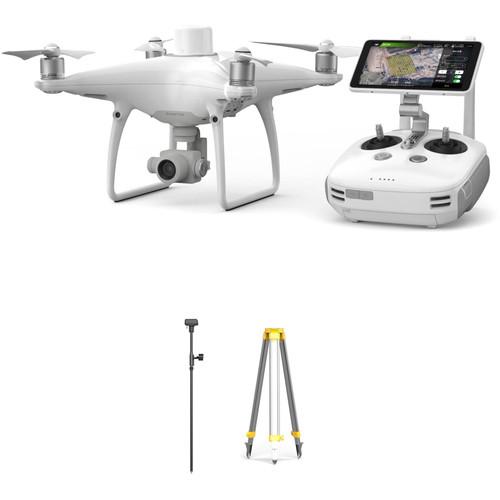 Contents of the user manual for the DJI Phantom 4 RTK Quadcopter with
- Product category: See All Drones DJI
- Brand: DJI
- Description and content of package
- Technical information and basic settings
- Frequently asked questions – FAQ
- Troubleshooting (does not switch on, does not respond, error message, what do I do if...)
- Authorized service for DJI See All Drones
|
User manual for the DJI Phantom 4 RTK Quadcopter with contain basic instructions
that need to be followed during installation and operation.
Before starting your appliance, the user manual should be read through carefully.
Follow all the safety instructions and warnings, and be guided by the given recommendations.
User manual is an integral part of any DJI product,
and if it is sold or transferred, they should be handed over jointly with the product.
Following the instructions for use is an essential prerequisite for protecting
health and property during use, as well as recognition of liability on the part of the manufacturer
for possible defects should you make a warranty claim. Download an official DJI user manual in which you will find instructions on how to install, use, maintain and service your product.
And do not forget – unsuitable use of a DJI product will considerably shorten its lifespan!
|
Product description Aerial Photography and Drone Glossary Read More beyqcqrdvsufbtevdtbrxwwfdd The Phantom 4 RTK Quadcopter with D-RTK 2 GNSS Mobile Station Combo from DJI is a Phantom 4 quadcopter with additional technology designed to deliver centimeter-level accurate mapping that can be extremely useful for surveying, construction sites, and inspections. Utilizing an RTK receiver on the top of Phantom 4 and a built-in GNSS module, the Phantom 4 RTK can achieve 1cm+1ppm RTK horizontal and 1.5cm+1ppm RTK vertical positioning accuracy.
In addition to the RTK receiver and GNSS module, the Phantom 4 RTK can achieve such accuracy thanks to DJI's TimeSync system and the gimbal camera's calibration process. The camera is the same one that's on a standard Phantom 4, but with the Phantom 4 RTK each camera has its radial and tangential lens distortions measured. They are added to the metadata of all captured images, allowing for accurate post-processing that account for the distortions.
The Phantom 4 RTK can perform mapping duties in real time, but this bundle also includes a separate D-RTK 2 GNSS Mobile Station and tripod to help compensate for locations where the Phantom 4 experiences poor or no signal. The Mobile Station can access GPS and GLONASS to provide real-time differential data, and can communicate that via OcuSync, 4G, Wi-Fi, or LAN. When mapping, pilots can utilize the Photogrammetry and Waypoint Flight modes in the GS RTK app which give mapping-specific functionality, such as selecting flight paths and directly loading KML area files. Combine it all and you have an enterprise-level mapping solution that can be used right out of the box. - DJI Phantom 4 RTK Quadcopter with D-RTK 2 GNSS Mobile Station Combo The Phantom 4 RTK Quadcopter with D-RTK 2 GNSS Mobile Station Combo from DJI is a Phantom 4 quadcopter with additional technology that is designed to deliver centimeter-level accurate mapping that can be extremely useful for surveying, construction sites, and inspections. Utilizing an RTK receiver on the top of Phantom 4, and a built-in GNSS module, the Phantom 4 RTK can achieve 1cm+1ppm RTK horizontal and 1.5cm+1ppm RTK vertical positioning accuracy.
In addition to the RTK receiver and GNSS module, the Phantom 4 RTK can achieve such accuracy thanks to DJI's TimeSync system and the gimbal camera's calibration process. The camera is the same one that's on a standard Phantom 4, but with the Phantom 4 RTK, each camera has its radial and tangential lens distortions measured. They are added to the metadata of all captured images, allowing for accurate post-processing that account for the distortions.
The Phantom 4 RTK can perform mapping duties in real-time, but this bundle also includes a separate D-RTK 2 GNSS Mobile Station to help compensate for locations where the Phantom 4 experiences poor or no signal. The Mobile Station can access GPS and GLONASS to provide real-time differential data and can communicate that via OcuSync, 4G, Wi-Fi, or LAN. When mapping, pilots can utilize the Photogrammetry and Waypoint Flight modes in the GS RTK app, which give mapping-specific functionality, such as selecting flight paths and directly loading KML area files. Combine it all and you have an enterprise-level mapping solution that can be used right out of the box. Mapping Technology - RTK + GNSS for Centimeter Accuracy
- The RTK receiver and GNSS module work together to provide flight stability along with centimeter-level mapping accuracy on image metadata. With the Phantom 4 RTK, you can achieve 1cm+1ppm RTK horizontal positioning accuracy, 1.5cm+1ppm RTK vertical positioning accuracy, and 5cm absolute horizontal accuracy of photogrammetric models (when flying at 100m high, 2.7cm GSD, on a sunny day. The RTK receiver can also be connected to the included D-RTK2 Mobile Station, NTRIP (Network Transport of RTCM via Internet Protocol), or it can store its data to be used in PPK (Post Processed Kinematics) after the flight.
- TimeSync
- The TimeSync system is engineered to help ensure the Phantom 4 RTK's ability to achieve centimeter-level accuracy. It continually aligns the flight controller, camera, and RTK module, as well as fixing the positioning data to the center of the CMOS. These optimizations give each photo the most accurate metadata possible.
- Phantom 4 RTK Controller
- The included controller with display is specifically designed for industrial users. It's pre-loaded with the GS RTK App, includes a microSD card slot, built-in speaker, and hot-swappable batteries. The controller can also connect to the internet for Network RTK with the addition of an (optional) 4G dongle.
- GS RTK App
- With the Phantom 4 RTK, you get the standard flight modes and abilities of a Phantom 4 quadcopter, plus mapping-specific Photogrammetry and Waypoint Flight modes in the GS RTK app. With these modes, pilots can select a flight plan while adjusting the overlap rate, altitude, speed, camera parameters, and more. Other features include a strong wind alarm, the ability to directly load KML area files for in-office flight planning, and the ability to use the shutter priority mode for keeping the exposure of your images consistent.
- OcuSync for Large Site Mapping
- The included remote controller with display utilizes DJI's OcuSync transmission technology to stream HD images and video up to 7 km away. With a strong enough signal, this gives you the opportunity to map large jobsites.
Gimbal Camera with 1" CMOS Sensor - The onboard camera features a first for the Phantom line: a 1-inch, 20-megapixel CMOS sensor. A custom-engineered lens made up of eight elements is arranged in seven groups. The camera boasts a mechanical aperture that eliminates rolling shutter distortion that can occur when taking images of fast moving subjects or when flying at high speed and a mechanical focus.
- 1" CMOS Sensor
- Sensor size is often more important to image quality than the number of pixels, because a larger sensor has dynamic range, better signal-to-noise ratio, and boosted low light performance. The 1" 20MP CMOS sensor in the Phantom 4 RTK is almost four times the size of the Phantom 4's 1/2.3" sensor. It uses larger pixels and has a maximum ISO of up to 12,800 as well as increased contrast.
- H.264 and H.265 4K Video Recording
- Powerful video processing supports H.264 4K videos at 60 fps or H.265 4K at 30 fps, both recorded in a 100 Mbps bitrate. Advanced sensors and processors ensure everything is captured with more image detail and the image data needed for manipulation in post-production.
- Production-Optimized 4K
- An enhanced video processing system allows video to be captured in cinema- and production- optimized DCI 4K (4096 x 2160) at 60 fps and a bitrate of 100 Mbps. The Phantom 4 RTK also supports the H.265 video codec at 30 fps in 4K resolution. For a given bitrate, H.265 doubles the amount of image processing as H.264, resulting in significantly enhanced image quality from a more efficient compression. Record in the high dynamic range D-log mode to make the most of this image data for color grading.
- High-Resolution Lens
- The Phantom 4 RTK camera has an aerial-optimized f/2.8 wide-angle lens with a 24 mm equivalent focal length. It features eight elements — two aspherical — arranged in seven groups that fit into a smaller, more compact frame. Its images are consistently detailed with low distortion and low dispersion, ensuring that photos and videos are sharp and vivid.
- Mechanical Shutter
- Capturing objects moving at high speed can be a challenge for flying cameras using an electronic shutter. This is why the Phantom 4 RTK is the first DJI Phantom to use a mechanical shutter and a large-aperture prime lens. A maximum mechanical shutter speed of 1/2000-second eliminates motion blur and "jello effect" caused by shooting a fast-moving object with a rolling electronic shutter. The electronic shutter has also been improved with a max shutter speed of 1/8000-second, and a there is Burst Mode shoot capable of shooting 14 fps at 20 megapixels to catch the perfect moment.
Remote Controller with Lightbridge HD Video Link - The Phantom 4 Remote Controller integrates an upgraded Lightbridge HD video transmission system that adds 5.8 GHz transmission support. The ability to choose between 2.4 GHz and 5.8 GHz allows pilots to cut through interference and eliminates image lag caused when flying in an area with extensive 2.4 GHz frequency use. Normally, Wi-Fi video transmission systems use a 2.4 GHz frequency to work with a controller using a 5.8 GHz frequency, as this prevents interference that can occur when both use the same frequency.
- Lightbridge HD Video Link
- The Lightbridge HD video transmission system used in the Phantom 4 RTK uses TDM (Time Division Multiplexing) to transmit signals, allowing it to send controller signals and receive video transmission signals at the same frequency. As the 2.4 GHz frequency band is often affected by Wi-Fi, 4G cell towers, and other types of interference in urban areas, a 5.8 GHz band will increase transmission reliability. When switched on, the Phantom 4 evaluates local signal levels, automatically choosing the transmission frequency with the lowest level of interference. This enables a maximum video transmission range of 4.3 miles.
Intelligent Flight Modes - Draw
- With Draw, simply draw a route on screen and the Phantom 4 RTK will move in that direction while keeping its altitude locked. This allows the pilot to focus on camera control and enables more complex shots. There are two Draw modes that can be used in different scenarios:
Standard: The aircraft follows the route at a constant speed with the camera facing in the direction of flight.
Free: The aircraft only moves along the route when instructed. In this mode, the camera can face in any direction during a flight. - ActiveTrack
- Following fast-moving objects can be very challenging, but advanced image-recognition algorithms used by the Phantom 4 RTK allow it to recognize and track an object while keeping it in frame. This algorithm also recognizes a range of subjects, from people to vehicles to animals, and will adjust its flight dynamics to match, ensuring smoother shots. Pilots can now choose between:
Trace: Follow behind or in front of a subject, avoiding obstacles automatically.
Profile: Fly alongside a subject at a variety of angles to get profile shots of the subject.
Spotlight: Keep the camera trained on a subject while the aircraft flies almost anywhere. - TapFly
- Fly in any direction visible on-screen with a simple tap. Tap anywhere on-screen to smoothly adjust the direction of flight while automatically avoiding obstacles and tap the screen again or use control sticks to change direction. An AR route function shows the aircraft's real-time flight direction for reference as its route is adjusted. As it can be difficult to control altitude, course, speed, and camera pitch simultaneously using joysticks, TapFly Free allows a pilot to set the direction of flight, allowing them to turn the Phantom 4 RTK or tilt the gimbal as required without changing the direction of flight. In total, there are now three TapFly modes:
TapFly Forward: Tap to fly in the selected direction.
TapFly Backward: Tap to fly in the opposite direction of the tap, e.g. tap in the bottom right corner of the screen to fly backward towards the top left.
TapFly Free: Lock the forward direction of the Phantom without locking the camera direction allowing it to turn as it flies.
Note: Obstacle Avoidance is not available with TapFly Free. - Return to Home
- In its Return to Home mode, the Phantom 4 RTK can automatically choose the best route to return home depending on environmental conditions. It records its route as it flies, allowing it to return along the same route and avoid obstacles if the control signal is disconnected.
Based on its altitude at the time of disconnection, the Phantom 4 RTK is also able to adjust its flight path to avoid obstacles it has seen during its flight. At takeoff, the Phantom 4 RTK will record the scene below and compare its recording with what it sees as it returns, for a more precise landing. It can also detect the ground to see whether there is a suitable spot for landing. If any obstacles are found, or if there is water on the ground, it will alert the pilot and hover at an appropriate height, helping the aircraft to land more safely. - Gesture Mode
- With Gesture Mode, selfies can be captured using a few gestures without the remote controller. Computer vision technology allows the Phantom 4 RTK to take instructions through gestures. The subject simply lifts their arms when facing the camera and the aircraft will recognize this movement by locking on and placing the subject in the center of the frame. When ready for a photo, the subject holds their arms out to signal the aircraft. A three second countdown will begin, making time to strike a pose, allowing moments to be captured without the remote control.
Flight Control System - Flight Modes
- Different productions require different flight characteristics, and the Phantom 4 RTK offers three modes for flight: P, A and S. Switching between them allows pilots to get the control they need, whether they seek smoothness, simplicity, intelligent navigation, or speed. In Position Mode (P), TapFly, ActiveTrack, obstacle sensing, and positioning features are available. Sport Mode (S) adds extra agility and higher speed, reaching 45 mph. Attitude Mode (A) switches off satellite stabilization and holds the Phantom 4 RTK's altitude. It is ideal for experienced pilots looking to capture smoother footage. Tripod Mode, which limits speed to 4 mph provides precision control for fine framing and indoor flying. Both the infrared sensing system and vision sensors are enabled in these modes for a safer flight experience.
- Sensor Redundancy
- The Phantom 4 RTK features dual compass modules and dual IMU units, making it more reliable when compared to many hexacopters and octocopters. Compasses and IMUs are important sensors to ensure a stable flight and the Phantom 4 RTK constantly compares the data it receives through both pairs. This data is run through various algorithms to check accuracy, and any inaccurate data is simply discarded without affecting flight, keeping the flight steady and reliable.
- Intelligent Battery System
- Professional aerial imaging benefits from longer flight times. The Phantom 4 RTK features a maximum flight time of 30 minutes, providing more time in the air to capture the perfect shot. The DJI GO app shows battery lifetime and calculates remaining flight times according to distance traveled and more. It will give alerts when it reaches a minimum safe amount required for a safe journey back to the takeoff point. An advanced battery management system is also in place to prevent overcharging and over draining. When placed in longer-term storage, batteries will discharge power to maintain good health.
UPC: 190021314740 - DJI D-RTK 2 GNSS Mobile Station for Phantom 4 RTK Drones Accuracy is key when drone mapping in industries such as construction, surveying, inspection, and real estate. The D-RTK 2 GNSS Mobile Station for Phantom 4 RTK Drones from DJI is designed to allow Phantom 4 RTK or MG-1P RTK drones the ability to access GNSS signals for centimeter-level mapping accuracy. The mobile station's high-gain antenna is capable of accessing all four of the major GNSS satellite constellations: GPS, GLONASS, Beidou, and GALILEO.
- Additional Features
- Connect controllers via 4G, OcuSync, Wi-Fi, or LAN
Connect up to 5 controllers for multi-drone operations
Supports Phantom 4 RTK and MG-1P controllers
Carbon fiber body and IP67-level weather protection
Built-in IMUs monitor movement and alerts operators of abnormalities
Can also be used as a CORS (Continuously Operating Reference Station) UPC: 190021325098 - DJI D-RTK 2 Mobile Station Tripod The D-RTK 2 Mobile Station Tripod from DJI works in conjunction with the DJI D-RTK 2 Mobile Station to help provide a stable platform for obtaining a GNSS connection. It's an essential accessory for the D-RTK 2 when attempting to achieve centimeter-level accuracy for drone-based surveying and mapping projects. The tripod is designed to affix securely to the ground utilizing spikes on the ends of each of the three legs. The 3.3' height and up to 23.6" leg extension help to achieve a solid GNSS connection for the D-RTK 2. UPC: 190021324718
In the Box - Phantom 4 RTK Quadcopter with D-RTK 2 GNSS Mobile Station Combo beyqcqrdvsufbtevdtbrxwwfdd
- D-RTK 2 GNSS Mobile Station for Phantom 4 RTK Drones
- Carrying Case
- Remote Controller with HD Display
- 16GB MicroSD Card
- 4 x Pair of Propeller Blades
- 2 x Intelligent Flight Batteries
- Remote Controller Intelligent Battery
- Intelligent Battery Charging Hub
- Intelligent Flight Battery Charging Hub
- Gimbal Clamp
- AC Power Cable
- AC Power Adapter
- Micro-USB Cable
- USB Type-C Cable
- USB Type-C OTG Cable
- 2 x Philips Screws
- Limited 1-Year Warranty (MC and Controller Charging Hub)
- Limited 6-Month Warranty (Gimbal Camera, Vision/Propulsion Systems, Controller, and Batteries/Charger)
- D-RTK 2 GNSS Mobile Station for Phantom 4 RTK Drones beyqcqrdvsufbtevdtbrxwwfdd
- D-RTK 2 Mobile Station Tripod
Camera in the Sky: Using Drones in Wedding Photography and Videos Peter Ward_1 02/29/2016 Some Good News for Photographers and Filmmakers Who Use Drones Peter Ward_1 02/23/2015 Table of Contents
|
Upload User Manual
Have you got an user manual for the DJI Phantom 4 RTK Quadcopter with D-RTK 2 GNSS Mobile Station Combo in electronic form? Please send it to us and help us expand our library of instruction manuals.
Thank you, too, on behalf of other users.
To upload the product manual, we first need to check and make sure you are not a robot. After that, your "Submit Link" or "Upload File" will appear.
Technical parameters - DJI Phantom 4 RTK Quadcopter with D-RTK 2 GNSS Mobile Station Combo
| | | Maximum Takeoff Weight | 3.06 lb / 1391 g | | Maximum Horizontal Speed | 31 mph / 13.9 m/s (P-mode)
36 mph / 16.1 m/s (A-mode) | | Maximum Ascent Speed | 13.4 mph / 6 m/s | | Maximum Descent Speed | 6.7 mph / 3 m/s | | Flight Ceiling | 3 mi / 6000 m | | Maximum Flight Time | 30 Minutes | | Hovering Accuracy | ±0.33' / 0.1 m Vertical with RTK
±0.33' / 0.1 m Horizontal with RTK
±1.64' / 0.5 m Vertical with GPS
±4.92' / 1.5 m Horizontal with GPS
±0.33' / 0.1 m Vertical with Vision Positioning
±0.98' / 0.3 m Horizontal with Vision Positioning | | | | GNSS Support | GPS, GLONASS | | | | Vision System | Downward, Forward, Backward, Left, Right | | Velocity Range | 31 mph / 13.9 m/s at 6.6' / 2 m | | Maximum Altitude | 33' / 10 m | | Operating Range | 0.0 to 33.0' / 0.0 to 10.1 m | | Obstacle Sensory Range | 2.0 to 98.0' / 0.6 to 29.9 m | | Forward Field of View | 60° (Horizontal)
±27° (Vertical) | | Downward Field of View | 70° (Front to Back)
50° (Side to Side) | | Backward Field of View | 60° (Horizontal)
±27° (Vertical) | | Measuring Frequency | 10 Hz (Forward)
10 Hz (Backward)
20 Hz (Downward) | | Operating Environment | Surface with Clear Patterns at >15 lux | | | | Obstacle Sensory Range | 0.6 to 23.0' / 0.2 to 7.0 m | | Field of View | 70° (Horizontal)
±10° (Vertical) | | Measuring Frequency | 10 Hz (Forward) | | | | Operating Frequency | 2.4 GHz (2400.000 - 2483.000)
5.8 GHz (5725.000 - 5850.000) | | Maximum Operating Distance | 4.3 mi / 6.92 km | | Transmitter Power | 20 dBm (2.4 G)
26 dBm (5.8 G) | | Output Power | 16 W | | Built-In Display Size | 5.5" | | Display Resolution | 1920 x 1080 | | Display Brightness | 1000 cd/m² | | Operating Temperature | 32 to 104°F / 0 to 40°C | | | | Sensor | 1" CMOS | | Effective Pixels | 20 MP | | Focal Length | 24mm / 35mm (35mm Equivalent) | | Lens Field of View | Horizontal: 84° | | Aperture | f/2.8 - 11 | | Minimum Focusing Distance | 3.3' / 1.0 m | | Photo ISO Range | 100 - 3200 (Auto)
100 - 12,800 (Manual) | | Video ISO Range | 100 - 3200 (Auto)
100 - 6400 (Manual) | | Electronic Shutter Speed | 8 - 1/8000 Second | | Mechanical Shutter Speed | 8 - 1/2000 Second | | Photo Resolution | 4:3: 4864 x 3648
3:2: 5472 x 3648 | | Photo Format | JPEG | | Video Format | 3840 x 2160p at 30 fps (MOV via H.264) | | Recording Media | microSD (Up to 128 GB) | | Operating Temperature | 32 to 104°F / 0 to 40°C | | | | Number of Axes | 3 (Pitch, Roll, Yaw) | | Control Range | Pitch: -90 to 30° | | Angular Speed | Pitch: 90°/s | | Control Accuracy | ±0.02° | | | | Battery Chemistry | Lithium-Ion Polymer (LiPo) | | Capacity | 5870 mAh / 89.2 Wh | | Battery Configuration | 4 S / 15.2 V | | Maximum Charging Power | 160 W | | Charging Temperature | 14 to 104°F / -10 to 40°C | | Weight | 16.51 oz / 468 g | | | | DC Input Power | 17.4 VDC | | Power Rating | 160 W | | | | Box Dimensions (LxWxH) | 20.0 x 16.0 x 11.5" | - DJI D-RTK 2 GNSS Mobile Station for Phantom 4 RTK Drones
| | | GNSS | Simultaneously receive
GPS: L1 C/A, L2, L5
Beidou: B1, B2, B3
GLONASS: F1, F2
GALILEO: E1, E5A, E5B | | Positioning Accuracy | Single Point
Horizontal: 4.9' / 1.5 m (RMS)
Vertical: 9.8' / 3.0 m (RMS)
RTK
Horizontal: 0.4" / 1 cm+ 1 ppm (RMS)
Vertical: 0.8" / 2 cm+ 1 ppm (RMS)
1 ppm: For every 0.62 mi / 1 km increase in distance, the accuracy will be 0.04" / 1 mm less. For example, the horizontal accuracy is 0.43" / 1.1 cm when the receiving end is 0.62 mi / 1 km away from the base station. | | Positioning | Update Rate: 1 Hz, 2 Hz, 5 Hz, 10 Hz, and 20 Hz | | Cold Start | < 45 seconds | | Hot Start | < 10 seconds | | Differential | Data Format: RTCM 2.x/3.x | | | | Data Link Protocol | OcuSync, Wi-Fi, LAN, and 4G | | Operating Frequencies | 2.4 GHz: 2.400 to 2.483 GHz (China, United States, Australia, Europe, Japan, Korea)
5.8 GHz: 5.725 to 5.850 GHz (China, United States, Australia) | | EIRP | OcuSync
2.4 GHz SRRC (Mainland China) / CE (Europe) / MIC (Japan) / KCC (Korea): < 20 dBm
2.4 GHz FCC (United States, Australia) / NCC (Taiwan, China): < 26 dBm 5.8 GHz FCC (United States, Australia) / SRRC (Mainland China) / NCC (Taiwan, China): < 26 dBm
Wi-Fi
2.4 GHz SRRC (Mainland China) / CE (Europe) / MIC (Japan) / KCC (Korea): < 20 dBm
2.4 GHz FCC (United States, Australia) / NCC (Taiwan, China): < 22 dBm
5.8 GHz FCC (United States, Australia) / SRRC (Mainland China) / NCC (Taiwan, China): < 22 dBm | | Communication Distance | OcuSync: 1.2 mi / 2 km (unobstructed and free of interference when the distance from the D-RTK 2 antenna to the ground is 5.9' / 1.8 m, when the difference in height between the remote controller and D-RTK 2 is < 6.6' / 2 m, and when the remote controller is 3.9' / 1.2 m from ground level) | | Memory Capacity | 16 GB | | | | Power Consumption | 12 W | | Power Supply | 16.5 to 58.8 VDC | | Battery Type | Lithium-ion | | Battery Capacity | 4920 mAh | | Battery Energy | 37.3 Wh | | Run Time | WB37 Battery: > 2 hours
MG-12000P Battery: > 50 hours | | | | Operating Temperature | 32 to 113°F / 0 to 45°C | | Dimensions | D-RTK 2 Body with Extension Rod: 2.7 x 6.6 x 67.2" / 6.8 x 16.8 x 170.8 cm | | IP Rating | IP67 | | | | Box Dimensions (LxWxH) | 55.0 x 9.0 x 8.0" | - DJI D-RTK 2 Mobile Station Tripod
| Compatibility | DJI D-RTK 2 Mobile Station | | Tripod Height | 3.3' / 1.0 m | | Leg Extension | 23.6" / 60.0 cm | | Dimensions | 5.1 x 39.4" / 13.0 x 100.0 cm | | Weight | 5.2 lb / 2.4 kg | | | | Box Dimensions (LxWxH) | 41.0 x 8.0 x 8.0" |
Rating100% users recommend this product to others. And what about you?

This product has already been rated by 44 owners. Add your rating and experience with the product.
Discussion
 Ask our technicians if you have a problem with your settings,
or if anything is unclear in the user manual you have downloaded.
You can make use of our moderated discussion.
The discussion is public and helps other users of our website who may be encountering similar problems.
Ask our technicians if you have a problem with your settings,
or if anything is unclear in the user manual you have downloaded.
You can make use of our moderated discussion.
The discussion is public and helps other users of our website who may be encountering similar problems.
The discussion is empty - enter the first post
Post a new topic / query / comment:
|
|
|
| Request for user manual |
You can’t find the operation manual you are looking for? Let us know and we will try to add the missing manual:
I’m looking for a manual / Request for manual
Current requests for instruction manuals:
Call Of Duty World War Two For Xbox...
controller stratus XL...
stratus XL...
smart whatch serie S11 42mm...
Allen & Heath SQ-6 manual...
|
| Discussion |
Latest contributions to the discussion:
AEW R 4100
Name: MAURICIO ANGARITA
Audio-Technica AEW-R4100 UHF Diversity Receiver for
AEW R 4100 has the mute function blocked and does not allow audio to pass. I tried several times to turn off the mute from the transmitter but it does nothing, the mute stays on. Solution?
Thank you...
Instructions for assembling the 2015 Forecast Image Master Consoles GC3-A
Name: mike elam
Forecast Consoles GC3-A ImageMaster Editing Console
Looking for instructions for assembling this console. ...
EMPTY TONER ERROR MESSAGE AFTER REPLACING TONER
Name: LINDA BAD YELLOW EYES
Brother TN223BK Standard-Yield Toner
I HAD TO CHANGE OUT ALL THREE TONERS DUE TO LEAKS IN THE YELLOW AND CYAN. AFTER I REPLACED THEM, THE MACHINE KEEPS GIVING ME AN EMPTY TONER ERROR MESSAGE. HELP!!...
PS480D 20/24 pin Switching 480W Power Supply
Name: swkargo
Logisys 480W Power Supply
This item states in can run -5vdc .It is NOT listed on the board or I beleive is r4 is missing the resitior. Any body have thid issue. Shawn
...
Help needed
Name: Ann Carter
SanDisk 1TB Extreme Portable USB 3.1
When I click the link to download the user manual for my Sandisk Extreme external hard drive, it gives me the manual for the LG Cricket. Can you please change the link so I can download the Sandisk manual and begin using this drive? Thank you....
|
|


